
This blog will be a quite short one compared to the other blogs as it’s more of an overview to show you the capacity of Fabric ingesting CSV files in their native format into a Lakehouse and ingesting SQL data into a table structure inside the Lakehouse. Simple, straightforward stuff without any form of modification. You could call it bronze, raw, ingestion, temp or whatever your preferred naming convention is.
Why is this important? Well, we still have source systems that can only output to files. Just as we still have customers running on SQL Server 2000, legacy or even antique systems are still running. And it’s important to know how much capacity you use when just ingesting data without any modification.
The test will only be run on an F64 Trial capacity for the simple reason that the CU numbers will remain the same. When lowering your capacity, the paralellism will drop, you might run into the smoothing and bursting of capacity loads and your mileage will vary. This blog serves the sole purpose to show differences in ingestion when modifying data or loading it binary in the two most common scenarios.
Scenario 1, CSV
Source
My source is an Azure Blob storage. No datalake gen2 frolics, just a blob storage with a simple folder structure.
Target
The target is a Lakehouse, freshly created.
Ingestion
The ingestion is done through a simple pipeline with one copy data activity that reads all the files and writes them out.
The numbers
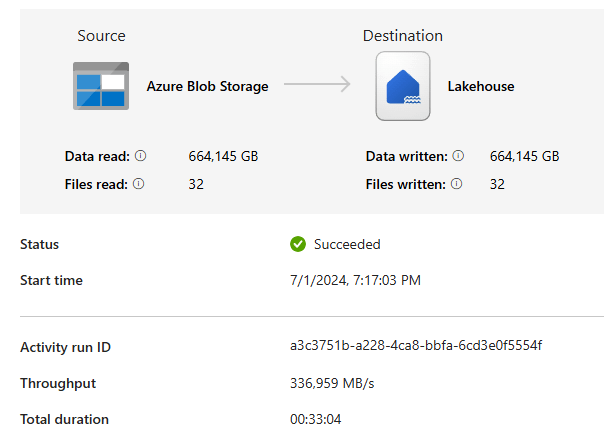
- Number of files: 32
- Volume: 664 GB (around 6,5 billion rows)
- Duration: 33 minutes
- Speed 336 MB/s (peak speed around 600 MB/s)
- CU’s used: 7
Scenario 2, reading from Azure SQL Server
The story changes a little bit here. Because you can’t write SQL output as a file without any form of modification. With a CSV file, I can do copy-paste and be done. With a SQL Tabular Data Stream, I need to save the data. As I’m writing to a Lakehouse, it makes the most sense to immediatly write it into tables. Writing it in Parquet format and then transferring the data in a table is mostly a waste of storage and unnecessary duplication of data. As SQL Server and Parquet have some differences in data types, some modifications need to be done when writing out to the Lakehouse. And that’s something you’ll notice in the Capacity Usage; it won’t be as low as the file ingestion.
Source
The source this time is an Azure Sql Serverless instance running with a minimum of 1 vCore and a max of 8.
Target
The target is a Lakehouse, the same one used for the CSV files.
Ingestion
Again a pipeline that has a ForEach loop with an array parameter holding all the tables in the source database. The schema’s were extracted automatically from the copy data wizard.
The numbers
- Number of tables: 19
- Volume: 40 GB (246.342.339 rows)
- Duration: 27 minutes
- Speed: 11 MB/s
- CU’s used: 85
- Source SQL Server CPU: 7%
- Source SQL Server Data IO: 13%

Summary
Long story short, if you want to ingest data from files into your Fabric Lakehouse, it takes 7 CU’s every 30 seconds. You Fabric SKU number will tell you the amount you have available by multiplying that by 30. F2 = 60 CU’s for example.
If you want to ingest data from SQL into your Fabric Lakehouse, it takes around 80 CU’s every 30 seconds. With an F4, you should get far but, as mentioned earlier, an F4 has a different smoothing and bursting characteristic that might mean your duration can increase. A lot. So test it out.
Ingestion speed of SQL really depends on your source table. One of the large tables with over 90 million rows in it has a clustered columnstore index that for some reason went much faster then the staging table that doesn’t have that. Also check column names and data types. Using a view where you change column names to something that is allowed in Parquet can prevent errors.
Finally
Thanks for reading and if you have results from your own tests, I’m happy to hear them!
 Reitse's blog
One thought on “Fabric Lakehouse Data Ingestion: CSV vs. SQL Scenarios”