
Welcome back to this mini series on Azure Sql Server with Copilot. In the previous posts I wrote about a general introduction of this toolset (click here for more) and had some fun in the Azure Portal getting stuff done (click here for more).
In this third part, I’m going in for the data and let Copilot show it’s potential on my wobbly database. Let’s see what it can do with creating queries, rewriting them and some maintenance questions.
Getting started
In the Azure portal, go to your database and look for the Query editor (preview) button on the left toolbar. Click it and log in.

When you’re logged in, you’ll see this toolbar:

On the right, you can see the button launch the copilot. After clicking it, the button will change to close copilot. I don’t know why there no capital c in this copilot by the way.

First impressions
The first thing you’ll notice is that the main bar has the text “Ask a question in a natural language and we’ll generate a SQL query.” Cool. Then below that there the catch; only Select statements are supported. There goes my hope for automation long insert or update scripts. I’d like to automate them because typing out all the columns I want to insert data into is tedious!
Then we have the option to do a table selection. As my database is very small in terms of tables, I haven’t been able to test this against databases with many, many tables. We all know that Sql Server Management Studio dies at some point loading all the tables. But this drop-down offers the opportunity to filter tables and let the process run a bit faster or get better results.
Data analysis
In my previous blog, I asked some questions about my tables and didn’t get an answer. So, let’s ask the question again on the columns.

Now, this is a special result. Because, query is not bad. In this case, Copilot is to harsh on itself because it isn’t hallucinating. At all.

This query returns the exact results I’m looking for.
But, let’s change the question and ask for the data types as well.


Again, Copilot is telling me it’s hallucinating when in fact, it isn’t. Again, a perfect query.

Create my query
Let’s make it a bit more difficult and see if it can create a query where it must join tables to get to the desired result.
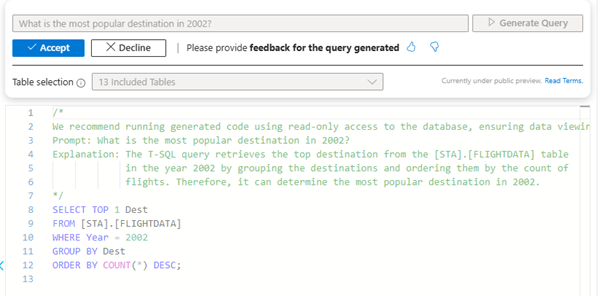
This query does return a result.

But it’s far from what I was expecting. So let’s change the prompt a bit.
What is the most popular destination in 2002? Show me the full name of the destination, the year and the number.

Now this one was a bit surprising, because I didn’t expect Copilot to understand my data. The keen readers among you will have noticed that I’ve reduced the number of tables included in the selection. What I did was remove the tables in the star schema; the ones that have meaningful foreign key relations. What’s left are the unconnected tables. Effectively, I tried to let Copilot trip.

Yet this outcome is exactly what I was looking for.
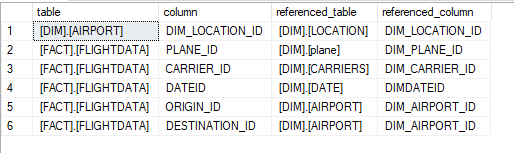
The Foreign keys available are these:

Smart cookie
To re-emphasise, Copilot can look at your data and create correct assumptions on the different tables. The names of the columns are wildly different, yet it can create a correct join construct. For me, this was a bit of a jaw dropping moment as I did not expect this result.
Getting a bit under the covers
I decided to dig into this one a little further with the help of an extended event. The event doesn’t do much more than catching the query text and it gives a little insight into how the inline query editor works and what Copilot needs to fulfil your requirements. The very first part is the inline query editor starting up and making sure the interface shows the correct data.
First, it does this:
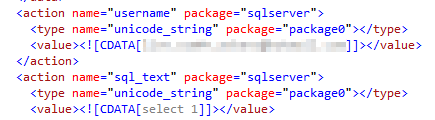
Under my user context, it’s doing a select 1. Just to check if the connection is alive and responding.
Next, it’s getting some data from the database:

The result:

A nice list of all the tables in my database, used to fill the query editor cache and the dropdown for the list of tables
Next, it’s creating a list of tables for the Copilot local cache. This cache is session persistent.

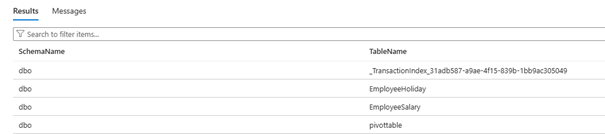
Then, Copilot is starting to collect data based on the previous query.

Now Copilot is aware of schema, table and column from the set of tables I’ve allowed it to read from.
The final query I managed to catch is this one.
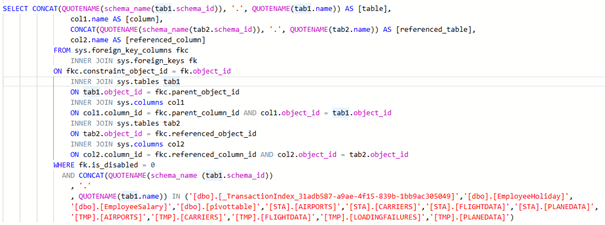
As expected, Copilot is going to look for foreign key relationships to build the correct statement. But alas, this query returns no result.
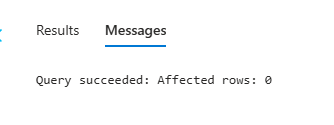
The only information it has are the table definitions. Now this is where the intelligence of Copilot starts to work. Because I wouldn’t be surprised if Copilot knows that a destination can also be described as IATA (International Air Transport Association) and that the codes have a good chance of matching. In fact, it should be aware of this as the query created returned a valid result.
But, I was pulling Copilot’s leg a bit. Let’s see what happens when I include all the tables, does the registered query change?

Here, only the number of tables changed, now including the ones from the star schema.
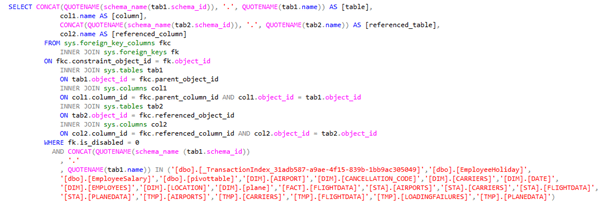
Same here, the number of tables changed, and the result is more valid; the actual foreign keys are shown and used as the generated query shows.
Asking the question again
As I changed the tables in the selection, I expected the answer to be different as well. And that’s exactly what happened. The generated query after adding the star schema:
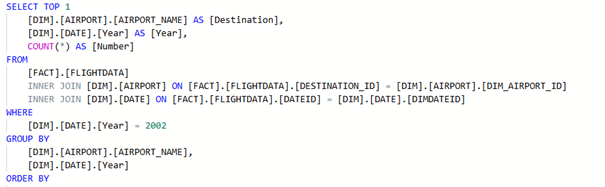
This query is the one that will offer the best result and performance.
In short, if there are foreign keys on the table that copilot deems usable, you’ll get an excellent query. If there aren’t, Copilot will start digging into its knowledge base and find out what could possibly match.
Maintenance
So, let’s try something else, in this case maintenance questions.

The answer?

This is somewhat of a starting point but not where I’d like or expect it to be. I have filed feedback on this part. There are my scripts you can find online that can get this job done for you.
Rewrite my query
The last thing I’d like to cover in my blog is rewriting a suboptimal query. Maybe you remember the one that came up in the portal experience?
This is the one:
Declare @year int = 2005;
WITH PreSelect
AS (
	SELECT C.DESCRIPTION
		,COUNT(CARRIER_ID) AS [Absolute Frequency]
		,ROUND(100. * COUNT(CARRIER_ID) / (
				SELECT COUNT(1)
				FROM FACT.FLIGHTDATA FFD
				INNER JOIN DIM.DATE D ON FFD.DATEID = D.DIMDATEID
					AND D.Year = @year
					AND FFD.DESTINATION_ID = 713
				), 4) AS [Absolute Percentage]
	FROM FACT.FLIGHTDATA FFD
	INNER JOIN DIM.DATE D ON FFD.DATEID = D.DIMDATEID
		AND D.Year = @year
		AND FFD.DESTINATION_ID = 713
	INNER JOIN DIM.CARRIERS C ON FFD.CARRIER_ID = C.DIM_CARRIER_ID
	GROUP BY DESCRIPTION
	)
SELECT T.DESCRIPTION
	,T.[Absolute Frequency]
	,(
		SELECT SUM(T2.[Absolute Frequency])
		FROM PreSelect T2
		WHERE T2.DESCRIPTION <= T.DESCRIPTION
		) AS [Cumulative Frequency]
	,CAST(ROUND(T.[Absolute Percentage], 0) AS INT) AS [Absolute Percentage]
	,CAST(ROUND((
				SELECT SUM(T2.[Absolute Percentage])
				FROM PreSelect T2
				WHERE T2.DESCRIPTION <= T.DESCRIPTION
				), 0) AS INT) AS [Cumulative Percentage]
	,CAST(REPLICATE('*', T.[Absolute Frequency] / 100) AS VARCHAR(100)) AS histogram
FROM PreSelect T
ORDER BY T.DESCRIPTION;
Yes it’s horrible, it runs for 14 seconds and uses half my processing capacity to return something that can be considered nonsense.
Rewrite
What happens when I feed the query into the generate query pane with the question to rewrite it?

Copilot didn’t like this syntax one single bit. Using a * or a / apparently means it will break something in the background.
As the query is in the query pane, maybe it’s aware of that?


Same question, different wording


So this is what it came up with. Yes. The more you read it and think about it, the funnier it gets. Because I had no stress, no pressure. I can imagine that if you are under stress and pressure and deadlines are coming close, this isn’t funny. The only way I’ve found to push Copilot into rewriting queries is to have it generate one and then ask it to rewrite it.
Github Copilot
Just because I can, I asked Github Copilot if it could rewrite the query for me.

Apparently, it’s good enough. On the other hand, I think this should be your route to improve queries when you want to improve your queries. Github Copilot is more suited as an IDE plugin as well (in this case Visual Studio Code).
Concluding
Concluding, what can the inline, natural language, Copilot do for you?
It can generate queries based on your data. It can generate excellent queries if you support your data with either meaningful column names or foreign keys. Or both. It cannot update or delete data.
If you want technical information about indexes and constraints, it’s limited (but feedback has been provided). It can rewrite queries it generated but not the ones you feed it. I’d suggest looking into Github Copilot for query improvements.
Will I use it? Certainly as it saves me a lot of time in typing. Changing a few lines of code is much easier than writing 60 lines myself and spending time on fixing typing errors. It also saves time as it is able to leverage the foreign keys and thus create correct joins. But still, you are the expert on the data, you need to decide if the result is good enough, meets your standards and fits with your way of working.
Finally, I would like to express my gratitude to Joe Sack and Wenjing Wang for answering all my questions, listening to my feedback and being kind and generous in their replies. These are the people I had the pleasure of directly interacting with but by extension, this goes for the entire team working on this product. Thank you!
If you have any experiences you’re willing to share, let me know in the comments!
Thanks for reading!
 Reitse's blog