
The best place to store your data is in a SQL Server database that no living being can ever access.
The end.
No, I’m kidding, of course. But there’s an atom of truth in this joke. Because for years we, in the structured data industry, have always been convinced that a database is the best place to store our data. And we had endless discussions about which one was best. Or worst. But we all agreed that the only place data was safe is in a place that no-one can access. The small issue with this is, if you’re working in data and analytics, having access to data does make your work easier.
Microsoft Fabric data stores
Now, secure access will be for another time, but there are a number of ways you can store data in Microsoft Fabric. Before you read on, try and compose a list for yourself.
Got it?
Cool, let’s see if you, or I, missed out on something.
- Onelake
- Lakehouse
- Warehouse
- Eventhouse
- SQL Database
Let’s walk through these.
Onelake
This is the biggest one, because all the information you have in Fabric is technically stored inside Onelake. Regardless of what storage option you choose, the data will be stored inside Onelake. As files.
The two things I want to highlight here is that the Lakehouse and Warehouse stores data in delta parquet, and that you can upload your files into Onelake and make them accessible for the Lakehouse and the Warehouse.
Onelake Explorer
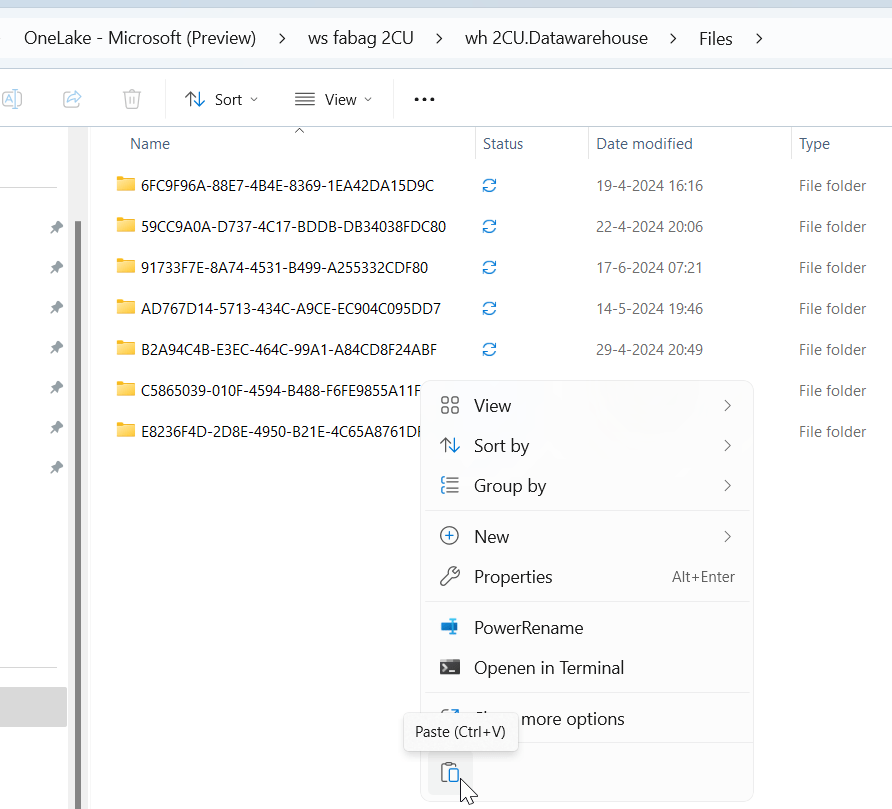
By using the Onelake explorer, an extension just like Onedrive in your Windows Explorer, you can see all the folders you have access to (depending on your permissions on workspaces and underlying items). And, if you’re more than a reader, you can upload your own files. Whatever you want, copy, paste, done.
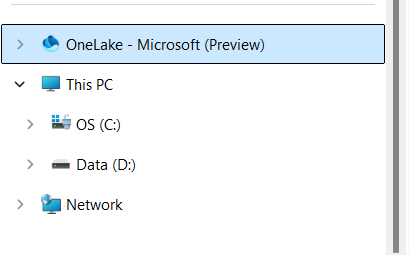
This means that every file you need for your analytics solution can be uploaded and used within Fabric. But, you need to be able to read that data to make use of it. A compiled .exe file won’t do much good I’m afraid.
Lakehouse
The Lakehouse is the storage environment where you can go and store all structured and semi-structured data. It really is the nice layer around your delta lake where you can do limitless magic (depending on your Fabric Capacity of course) and create amazing solutions. It makes the best use of the available spark compute and supports a number of languages.
As mentioned before, the data is stored in delta parquet and shown to you as tables. To make life a little easier for us SQL people, there’s a SQL endpoint where you can show off your cool skills in this language whilst still leveraging the spark compute powering your Lakehouse. So yes, you can connect SQL Server Management Studio to the Lakehouse. Remember, it’s read-only access regardless of your permissions inside Fabric.
Warehouse
The Warehouse is more structured, literally, as it tries to work like a SQL Database, but not quite. You can use most of the T-SQL syntax, create stored procedures etc. But the data needs to be structured into tables. The key word is structured. You can insert data from a CSV file but it will require you to define the structure of this file. And the data types.
The funny thing is, the data is saved in Onelake as delta parquet. The good thing is, this makes sure you get the most of the spark engine powering the entire Fabric environment. The less good thing is, your SQL environment now has to deal with some of the limitations spark has compared to SQL. Some data types are not supported, identity columns don’t exist in that way and other things you will have to find a way to work around.
So yes, there are some limitations, especially compared to the regular SQL databases, but if you can work around those, it’s very much a viable solution. And when you want to modify data, you can do that using SQL, opposed to the Lakehouse where you can only modify data using Pyspark.
Eventhouse
The Eventhouse is a different storage; when you have real time, streaming data or data that can be described as time-series, go to this one. It can easily handle large amounts of data. You can’t use SQL but you need to use KQL to query it. I’ve written blogposts about the eventhouse and KQL to help you get started. Instead of repeating content, click here and here to learn more.
SQL Database
This is the new kid on the block, or at least inside Microsoft Fabric. It is a fully operational death star.. no wait, database with full T-SQL support. It will respond the way you expect it to and will store it’s data into MDF, NDF and LDF files. These are hidden from our view but there is replication into delta parquet where we can access the files. Again, structured data. At the time of writing (february 2025) it’s in public preview.
The main use case for the SQL database in Fabric is OLTP, the documentation states that quite clearly too. So you might want to try and use it for your data warehousing solutions but to be honest, it’s not created for that. If you’re looking for a SQL based approach, use the Warehouse.
Comparison
Now, to get a good grip on all the options, let’s create a comparison grid on the different types of data.
- Structured data is data that has a fixed data schema; data you’ll find in any structured database like SQL Server, Oracle or MySQL for instance
- Semi-structured data is data that has a data schema but doesn’t have a fixed requirement on all elements being there. JSON and XML are the best examples of these; you can never be sure every tag is in the files you get.
- Unstructured data is everything else.
| Lakehouse | Warehouse | Eventhouse | SQL Database | |
| Structured |  | | | |
| Semi-Structured | | (JSON) | | (JSON, XML) |
| Unstructured | | |
For more comparisons, follow this link.
Video
So, after this not too long blogpost, let’s go to Valerie to get her points of view on this subject.
 Reitse's blog
One thought on “DP-700 Training: Choose an appropriate data store”