
Data security is the most important part of our job as data engineers and data architects. There are very few use cases where people need to see all the data in full detail. I know, customers take a different view on this but in reality, do they really need every single detail?
No, they do not. They think they need everything, but they don’t. Only when data seems wrong and analysis is taking place where things have gone awry, then a use case can occur where more details are needed to find the issue or culprit.
The most important thing to remember is that data masking is not anonymising your data. You shouldn’t use it and assume your data is safe. The only thing data masking does is putting a mask over it. And just like wearing a mask for a party, it’s not that hard to remove it or find out what’s underneath it. That doesn’t mean it’s a useless functionality but it is something to be aware of.
Right, now that a lot of you are angry with me, let’s see how Microsoft Fabric can help by masking data.
SQL Server
Gotcha, I’d like to start with SQL Server. Not just because I still carry a lot of love for SQL Server, but also because there’s some solid documentation to be found. Click here to learn more.
SQL Server offers a few defaults to mask and you can create your own masking function.
There’s the default, email, random, custom string and date time. This may not sound like much, but it will give you enough options to mask any data you want to make less easily accessible.
Seeing it in action
To see the differences in action, run the following script in your preferred version of SQL Server Management Studio (21 preview will do best of course).
DROP TABLE IF EXISTS dbo.MaskingTable;

CREATE TABLE dbo.MaskingTable (
  ID int IDENTITY(1,1),
  FirstName varchar(20) MASKED with (FUNCTION = 'Partial(3,"AbC",1)') NOT NULL,
  LastName varchar(30) MASKED with (FUNCTION = 'default()') NOT NULL,
  Email varchar(40) MASKED WITH (FUNCTION = 'email()') NOT NULL,
  SecretDate datetime MASKED WITH (FUNCTION = 'datetime("Y")')NOT NULL,
  TopSecretNumber int MASKED with (FUNCTION = 'RANDOM(1,1000)')
)
This first script will create a table for you with some columns to hold data. Just remember to drop the table after you’ve tested it out for yourself.
But, what do these masking functions do?
Before moving on, let me try and explain what these functions do. Especially when you these for the first time, they can be hard to decode.
Partial
The partial function you see has three parts: 3, “AbC”, 1. What this effectively does is take the first three characters of whatever is in the column. Then add the AbC part and it ends with the last character of the value. Suppose your value is “ValerieCreatesAmazingYouTubeContent”. The function will take the first three characters: Val. Then add AbC and it well then add the last character, the t. The user that can’t unmask the data will see ValAbct.
Default
The default function is a very simple one. It replaces any value in the column with four X’s. You’ll see in the screenshot later that all the column returns is xxxx. Simple but effective.
The predefined Email function is quite easy to work with as well. It takes the first letter of your email address, then adds three X’s. This is followed by the @ sign and four X’s. The domain name is always .com. So if my email were to be AverageBlogWriter@Nonexistent.eu, the function would return Axxx@XXXX.com. Apart from the first letter, there’s no relation to the email whatsoever.
Datetime
This one is a newer function compared to the first release of dynamic data masking. In essence, it replaces values from the date or date time with default values. It’s comparable to the email function. Suppose you have a date in your system of 1994-07-20 and you have the function set to year. This means the year will be obfuscated, the month and day will not. The result will be 2000-07-20.
Random
The last one is my favourite because it is quite random. If I have column in my table with numbers, I can randomise the result by using this function. All I need to do is tell it what the range is and it will print a random number every time the data is requested. In my table, I’ve given it a range from 1 to 1000. With every select, it will select a number in that range and return it.
Insert data
Next, let’s add some data to this table.
INSERT INTO dbo.MaskingTable (FirstName, LastName, Email, SecretDate, TopSecretNumber)
VALUES
('Hello There', 'Obi Wan', 'Kenobi@Rebellion.Empire', '1900-01-01', 99),
('Try there is not', 'Yoda', 'MasterYoda@Rebellion.Empire', '1945-01-01', 99),
('UWAAHguuuhff', 'ChewBakka', 'Chewy@Rebellion.Empire', '2025-07-29', 99)
Now that there’s data in here, what does it look like when selected?
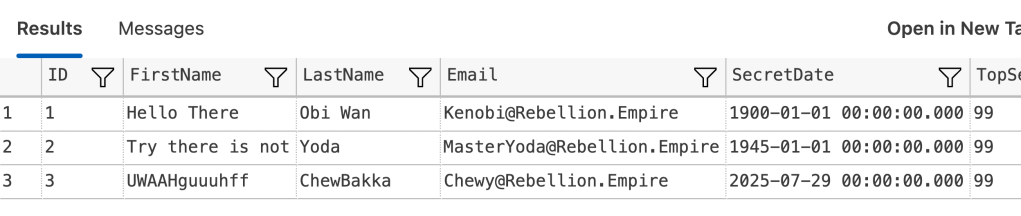
OK, nice. Let’s see what happens when no longer allowed to unmask the data. I’m doing this by creating a new user without login and without unmasking permissions.
CREATE USER NoUnMask WITHOUT LOGIN;
GRANT SELECT ON dbo.MaskingTable TO NoUnMask;

EXECUTE AS USER = 'NoUnMask'
SELECT *
FROM dbo.MaskingTable
REVERT;
The result:

Now, this looks quite OK with, to be honest, hard to decipher data. The numbers on the right are totally random and will change with every execution.
Finally, let’s see if we can ‘break’ the masking by selecting on specific values.
EXECUTE AS USER = 'NoUnMask'
SELECT *
FROM dbo.MaskingTable
WHERE FirstName LIKE '%Hello%'
REVERT;
The result may or may not surprise you.

Remember that I wrote about masking not being the same as anonimizing your data? Well, this is the reason. You can still use filters to find the rows you’re looking for. Even though the data itself is still obfuscated from you as the reader, you can still query and filter the data to find the rows you need.
Microsoft Fabric
Well, it’s almost the same there 🙂 Just remember, you can only run this code in Fabric Warehouse and the Fabric SQL Database as there are the only SQL options.
Fabric SQL Database
When I ran the entire script on the Fabric SQL database, to my huge surprise I found that data masking doesn’t seem to work. I can create the user without the permissions to unmask the data, execute the query as that user but I still get the regular results instead of the masked results.
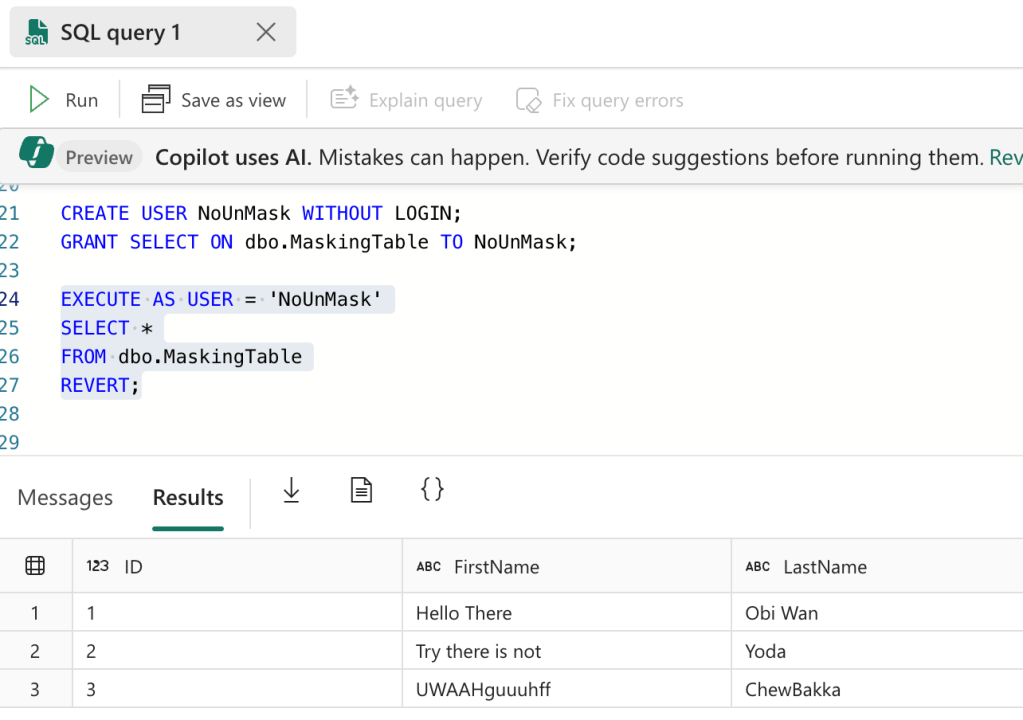
When I found this, I had a little chat with Microsoft and they told me that I’d have to use another user to test this. Therefore, I created a new user in Entra ID, provided it with viewer permissions and tried again.
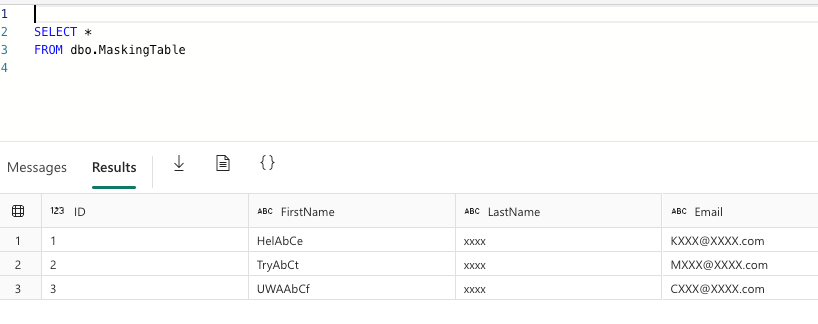
As you can see, I skipped the execute as part as this new user doesn’t have the unmasking permission anyway. So now it works.
Fabric Warehouse
Running the same script at the Fabric Warehouse didn’t work. This wasn’t entirely surprising though. First, the table definition contains an identity and these aren’t supported in Fabric warehouse. Second, the datetime datatype isn’t supported, I had to change it to datetime2(0) to get a valid result.
Next, I was able to ingest the data and read it from the table. But the thing is, not only do I want to read as the user that ingested the data and has the option to unmask the data, I also want to create a user that hasn’t got those permissions.
Thing is, you can’t do any of these things in Fabric warehouse. You can’t create a contained user nor run a statement using execute as.
So, just like I had to do with the Fabric SQL Database, I used the newly created user to check if the data masking works.
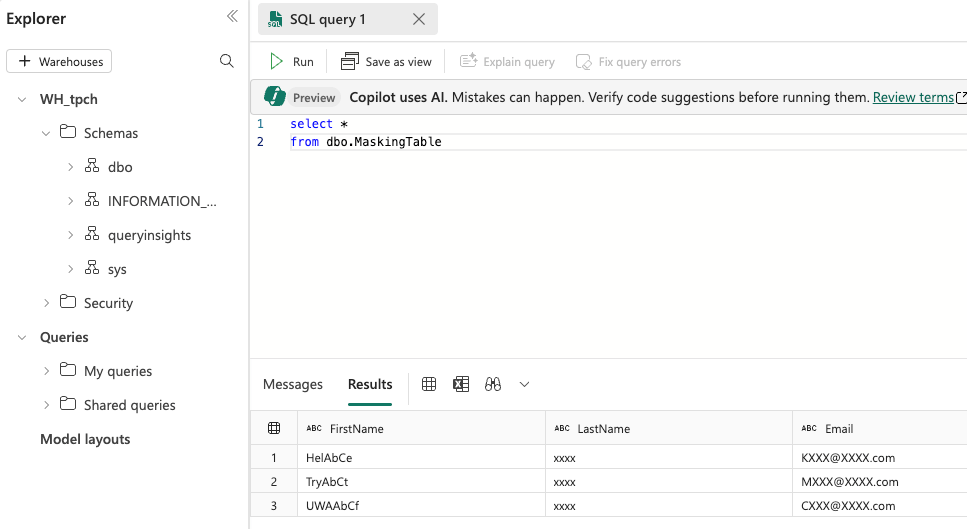
Click here to read the official documentation on how dynamic data masking works in Fabric Warehouse.
Permissions matter!
My major learning point from writing this blog was not how data masking works. I knew it from SQL Server including the limitations. What I mostly learned is that permissions in Fabric work differently. Even more so if you’re used to Azure Role Based Access Control (RBAC) rules.
For instance, a contributor in Azure can do everything apart from user management. In Fabric, they call that a member. Azure has a reader role, Fabric calls it a viewer. The adminstrators are the same but then Fabric has the contributor role that is nothing like the Azure contributor role.
This was very confusing for me as I’m coming from the Azure world and have had to learn all the RBAC roles to create an environment that is as secure as possible. However, it’s essential that you understand these differences to prevent mucky stuff like I ran into.
Video time
After reading about me stumbling over permissions and interpretations, it’s time to see the video Valerie created on this subject!
 Reitse's blog
One thought on “DP-700 training: data masking”