
If you come from an SQL Server background, mirroring will be familiar to you. It may be good or bad, but hopefully not at a nightmare level. Whatever your association with database mirroring, it is also available within Microsoft Fabric.
What is mirroring
If you’re not coming from a SQL Server background, or any data background at all, and you have no clue what mirroring is, let me try to give you a simple introduction.
If you have an OLTP (Online Transaction Processing) database, its primary purpose is to process transactions. It’s in the name. By and large, it’s not meant to run other processes on because you want the transactions to finish. In other words, you want customers to finish their purchases. And you do not want a customer to become impatient because the screen they’re facing tells them to hold for a moment. Especially not because someone is running a different process on the database to extract data from it.
Yet, there are still people in the world who enjoy creating reports based on data. Preferably accurate and recent data. One way to retrieve recent data from a database is to run queries on it. But, as mentioned, you don’t want to affect the customers in your shop. There are several ways to solve this problem, one of which is database mirroring.
What this effectively does is create a mirrored image of the database in a different location. Now, don’t take the mirrored part too literally; it’s not like the data is presented backwards all of a sudden. It’s an almost live copy of the data. The beauty of this is that it shouldn’t interfere with the transactions customers are running; it should be a non-intrusive process where everybody’s happy, the sunsets are beautiful, and the food is excellent.
What you end up with, as a data engineer or report builder, is a database you can freely abuse in any way possible without hampering your business’s vital processes.
Now, I know I’ve skipped a whole lot of details, nuances, ifs, and buts. But in essence, this is what mirroring does.
Opinions.
Before I discuss this technique in Microsoft Fabric, let me share a few perspectives. First, please do not treat this as a backup technique. Because it’s not. Backups should be handled differently.
Please consider the implications before using this mirroring technique to offload read-only processes for purposes other than data engineering. It will work, but please read this warning.

As I look at this, you now have two loosely coupled locations to keep in sync with your database permissions. And be honest, will you be able to keep that in sync? Personally, I don’t want to take on that responsibility.
As I’ve mentioned in other blogs, this option contradicts data minimisation strategies; with mirroring, you get all the data in Fabric.
Bad choice?
Certainly not! But I strongly urge you to consider whether you need all the data. Or maybe there is a better option available for you. Options like the Copy Job, copy data activity, or a data flow Gen2 can get your data in on a much more granular level than mirroring. Yes, the mirroring will be based on your permissions, but even then, more data might be mirrored than you assumed.
Remember that mirroring can give Fabric users more access than you’d initially assume.
Create mirroring
To create a mirrored database in Microsoft Fabric, follow these steps. This link will take you to the official documentation, which will point you to different sources you can mirror.
In this blog, I’ll guide you through the steps of setting up an Azure SQL Database mirror.
Finding the new item.
Mirroring is created at the Workspace level. This means that you have to create a new item. To quickly find it, I prefer using the filtering option in the top right corner instead of scrolling through all the options.

Select a database.
When you click on the source you’d like to mirror, the following screen opens. In my case, it shows an existing connection, but you can also create new ones.
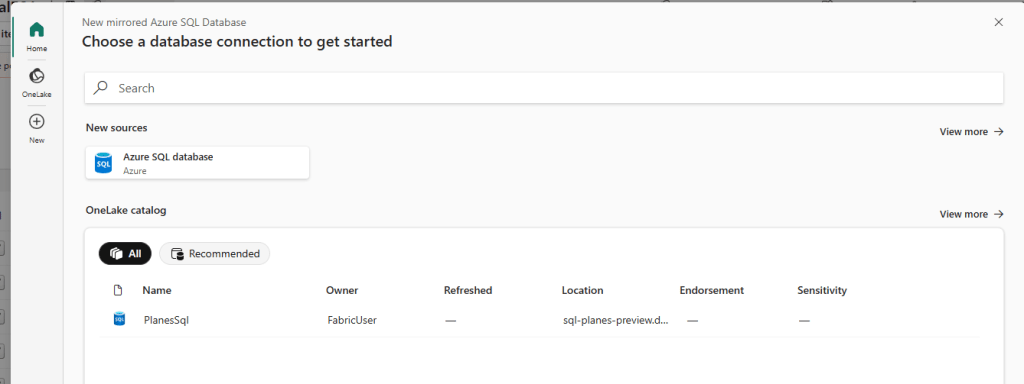
Click on the database you want to mirror to see the following screen.

After a while (depending on the tier and SKU of your database, the number of tables and your F SKU, you’ll get an overview of the database.
Error messages
When the scan was complete, I saw two error messages.
The first one is related to the clustered columnstore index.
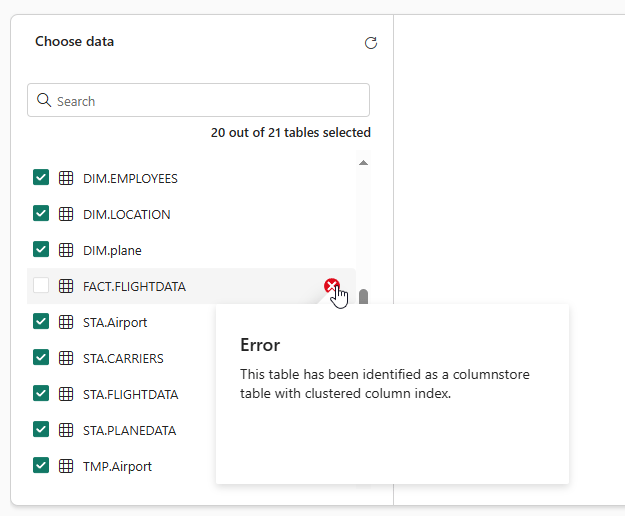
I’m unsure why this is, but it could prove problematic in real-life scenarios.

The second error feels a bit weird. It instructs you to connect to the database using the workspace identity instead of a regular Entra ID account. Think about this. Fabric encourages you to use the logical service system-assigned managed identity. Truthfully, it took me a bit of time to realise it was the logical server identity (found under Security in the Azure portal) and not the identity you can set at the database level.
To verify connectivity, click on a table to view the data.
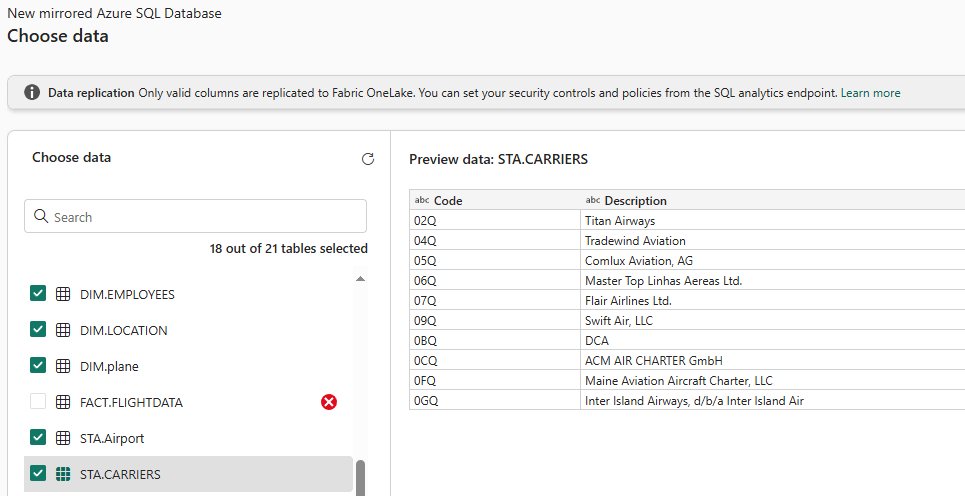
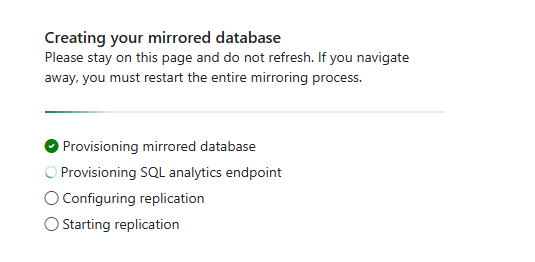
Click ‘Connect’, followed by ‘Create Mirrored Database’ to finish this wizard, and magic should start to happen.
Monitoring
Once the process is essentially complete, you can then monitor the mirroring.
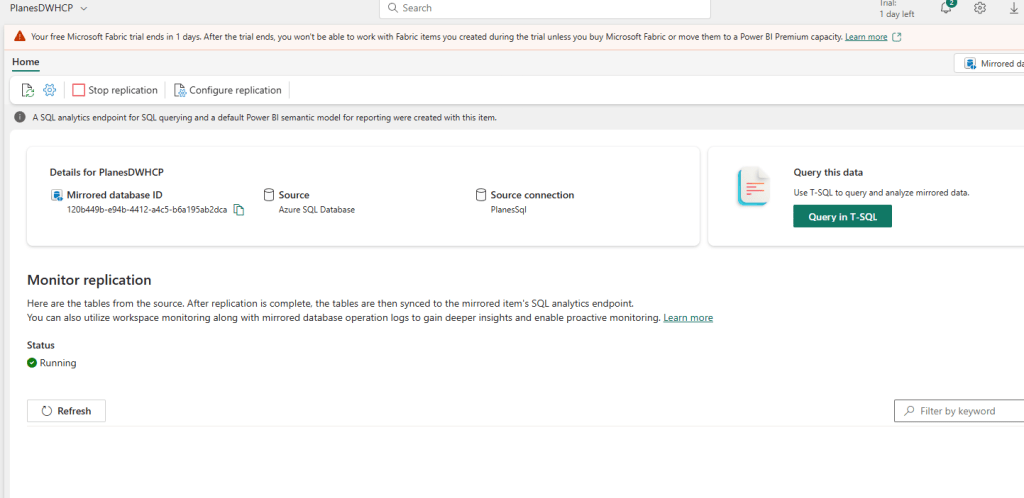
A minor pet peeve from me: Notice that Microsoft Fabric uses both Mirroring and Replication in the same item, whereas seasoned SQL Server DBAs know that these are vastly different techniques.
When I click refresh, I can see the tables being imported.
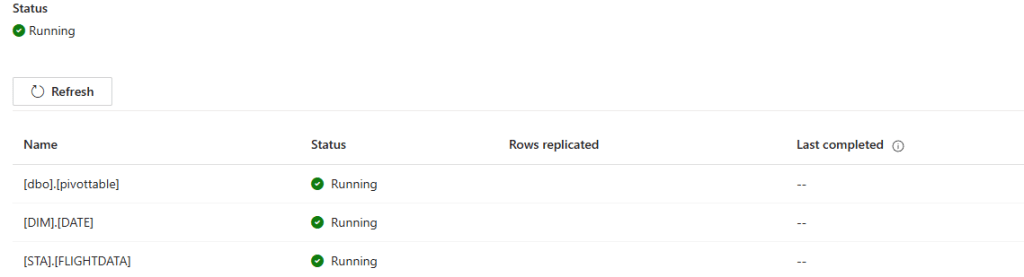
If you’ve ever created a Dynamics link to Synapse, you might recognise this. It appears to be the same, with the table name, status, replicated rows, and last completed date.
And after a while, you’ll see this:

I then decided to add a row to a table to see what would happen.
And within a minute (the monitoring pane took around 30 seconds to show the change), the replication had picked up the new row.

Mirroring done
So there you have it—mirroring in Microsoft Fabric. You can now use it in your Fabric Warehouse, for instance, with cross-database queries.
Video!
Now, let’s see what Valerie has to say on this subject.
 Reitse's blog
One thought on “DP-700 training: Implement mirroring”