
When Microsoft Fabric was introduced in May 2023, one of its major promoted components was the Real-time Analytics part. We (that is, my coworkers and I from Axians) focused mainly on the batch processing of data. With the introduction of the DP-700 exam, I started to focus more on the real-time part of Microsoft Fabric. I also kept in touch with a few people who have their main focus on Eventhouses.
Fast Forward to 2025
When discussing options, possibilities, and solutions with customers, the Real-Time stack began to emerge. We received questions on ingestion that couldn’t be simply answered using batch processing. The best part is that we can start learning new technology!
The following blog will outline the best things I learned working with real-time analytics.
Ingesting data
For one project, we’re using Azure storage blob triggers. The Eventhouse interface has a great wizard to help you out with this. In a few clicks, you’ll have the process in place, and you can just add files to the blog storage. Make sure it’s the data lake Gen2 kind. I was surprised how easy it was to create this ingestion. In the near future, I’m hoping to connect to other streaming sources as well to get more experience.
Capacity usage
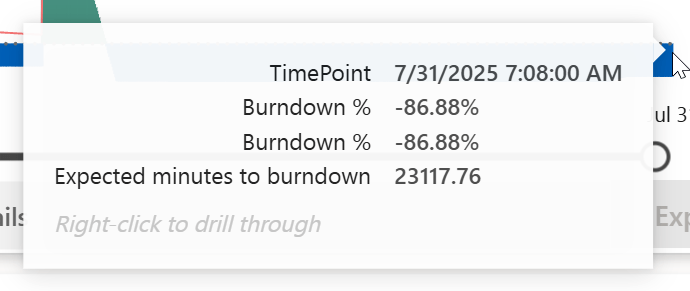
The main learning you should get from this part is to watch your capacity usage app, because you do not want to run into this:

Yes, this is 500.000 percent overage. Now, you might wonder how I did this. And that’s fairly easy to reconstruct; I misread the documentation that was available at that time.
Always-on
I enabled the always-on option.

When you get to this setting in the Fabric Eventhouse, you can enable Always-on and then select a minimum capacity. The numbers you’re seeing here (4.25, 8.5, etc) were interpreted by me as numbers to compare with the 30-second capacity usage. F2 has 60 CU’s, F4 120 and so on. The thing is, these numbers relate to the Fabric SKU. In other words, to use the lowest option, you’ll need an F8 to avoid overages.
To emphasise, if you want to run a Fabric Eventhouse at a minimum capacity of 4,25 CU’s, you need the F8 SKU. If you’re below that threshold, you will start accumulating overages.
Please, learn from my mistake.
The effect? Well, a long burn-down.
Policies
Eventstreams like to have an Eventhouse table as a target. But, depending on your requirements, saving the data into that initial table isn’t always necessary. To ensure you’re not wasting storage space, consider using an update policy with a 0s retention. In our use case, we’re ingesting XML files that need to be expanded into columns. The eventstream wants to save the data into the primary ingestion table, but it doesn’t really have to remain there. By adding the policy, the XML data is processed and then dumped. The original XML data is still available in the storage account, but it won’t use any of the Eventhouse data storage.
Materialised views
Even though Kusto databases are excellent for fast aggregations, you can improve these by creating Materialised views. In essence, you’re creating a small table with pre-aggregated data. Not only does this make your life a lot easier when you’re referencing this aggregated data, but it also eases the load on the other tables.
If you want to go really funky, you can build a materialised view on top of another one. Especially when you have to do more things than allowed within one materialised view, it can be very helpful to build them on top of each other. There are some things you need to take into account when you’re building materialised views on top of other ones. Make sure to check the documentation!
Distinct
The distinct operator is a very strong piece of syntax that can do a lot of good. The thing is, use it with care. As I found out, when you start your KQL statement with a distinct operator and end the statement with a “summarize” operator, Kusto will do multiple summarisations on the data. And it has to keep all the data in memory. You can imagine what will happen; you’ll run out of memory, even when running on the F64 SKU.
Monitor the creation of materialised views
When creating a materialised view, use the async option to prevent it from consuming all the front-end capacity or timing out. But even when it’s running in the background, things can happen that stop the creation. Apart from errors in syntax that emerge immediately, I’ve mainly run into issues with the admin node. For some reason, Fabric decides that it has to move things around and, in the process, abandons the creation of the view.
Monitoring this process is quite simple; When you start the async process, you’ll see a guid. This guid can be used in the following query.
.show operations 'a123456-123456'
| project Operation, StartedOn, Duration, State, Status
This will return the information you need when monitoring the progress. Creating these views can take quite some time, depending on the amount of data that needs to be processed. But this mainly has to do with views that use the backfill option, which allows for the ingestion of data that’s already available. Without this option, you’ll only show the data ingested or processed from the moment the view is created.
Overall experience
We’ve been experimenting with the Eventhouse, and our main observation is that it can be extremely fast. Especially when you filter early in your KQL query, it can return results at incredible speed. Even on raw XML data (the XML files are somewhere between 10 and 350 KB), expanding the XML tree and returning data is fast. And, more importantly, those queries weren’t exactly killing the capacity. The always-on option was the one that killed the capacity.
Some people are advocating for running your entire data warehouse within the Eventhouse. Create the star schema or even load everything into one table and go from there. I can see where they’re coming from, but since storage is more expensive, it may not be the most viable option.
In short, try it out if you have a form of streaming data and see what it can do for you, but be aware of the lacking guardrail with always-on.
 Reitse's blog
One thought on “Mastering Real-Time Analytics with Microsoft Fabric”