
In a previous blog post, I discussed my initial impressions of SQL Server and the key features that are relevant to my work in Business Intelligence. This time, I want to focus on a specific and improved feature of SQL Server, namely extended events.
What are they?
To provide some context, let’s begin by defining what they are. If you’re already familiar, scroll down to the part where I’m digging in deeper.
If you’ve been using SQL Server for a long time, you’re most likely a user of SQL Profiler, a toolset that returns a lot of information on what’s going on inside the SQL engine. You can see compilations, executions and a lot of geeky stuff. And even though it’s still a valid tool, an alternative has been available for quite some time now, called extended events. You can find these in the object explorer in SSMS or, if you’re really code-first, by using T-SQL.
Extended events are a more fine-grained, better-configurable, and, when you’re used to them, easier-to-use option for collecting data from the engine and analysing what’s going on.
What’s new?
What’s new in SQL 2025 is that the team behind SQL Server 2025 has addressed an issue that I’ve encountered once or twice as well. If you start an extended event, it will run until you stop it. Yes, you have to manually stop it. If you don’t, it will stop eventually. Together with some other services, because the disk space has run out. In my case, I was fortunate that the servers were monitored and alerts were triggered due to low disk space.
In this new version, starting with Release Candidate 0 (RC0), you can configure the duration.
Show me!
Alright then! If you insist :).
First, let’s locate the extended events in the Object Explorer of SSMS.

Right-click here and go to the sessions.
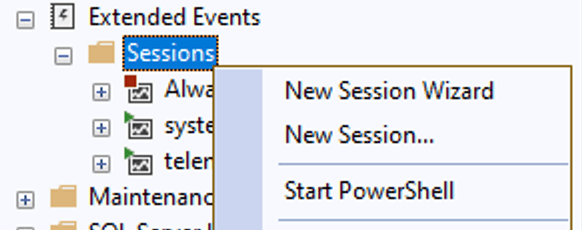
You can choose to either create a new session or use the wizard. My personal preference is to create a new session without the (tree) wizard.
Now, with SQL Server 2025 RC 0 combined with SSMS 21.4.12, the setting for max time isn’t in the Create New Session dialogue. However, it can be accessed using T-SQL code.
T-SQL
The following code creates an extended event that captures all queries executed on the server for a specific database. This is NOT something you should run like this on your production machine; you should add filters. I explained at the beginning that you can be very fine-grained in collecting the events. You should.
The code shown below uses an event called SQL statement completed. This event is triggered when the SQL statement completes. There are many options you can log; these are called actions. In this case, I’ve chosen the app name, the client host name, the database name, the username, and, most importantly for my fake use case, the SQL text (the actual query).
As usual, the where clause filters the result set, trimming it down from all the databases to just one.
The ‘Add Target’ option is available to save the data to a specific location. I don’t want to persist the data, so I’ve chosen the ring buffer. Finally, there’s a list of options in the WITH clause where you can set the maximum amount of memory, among other settings.
CREATE EVENT SESSION [MVP Blog test session] ON SERVER
ADD EVENT sqlserver.sql_statement_completed(
    ACTION(SQLSatellite.AppName,
            sqlserver.client_hostname,
            sqlserver.database_name,
            sqlserver.sql_text,
            sqlserver.username))
    WHERE ([sqlserver].[database_name]=N'DemoDB'))
ADD TARGET package0.ring_buffer(SET max_memory=(51200))
WITH (MAX_MEMORY=4096 KB,
        EVENT_RETENTION_MODE=ALLOW_SINGLE_EVENT_LOSS,
        MAX_DISPATCH_LATENCY=30 SECONDS,
        MAX_EVENT_SIZE=0 KB,
        MEMORY_PARTITION_MODE=NONE,
        TRACK_CAUSALITY=OFF,
        STARTUP_STATE=OFF)
GO
As you can see, the event has no max duration specified.
Adding the max duration
Well spotted! Now, take a look at this additional option you can add in SQL Server 2025.
MAX_DURATION = UNLIMITED. Well, this is the unlimited run we already have. But let’s change this to 30 seconds.
DROP EVENT SESSION [MVP Blog test session] ON SERVER;
GO

CREATE EVENT SESSION [MVP Blog test session] ON SERVER
ADD EVENT sqlserver.sql_statement_completed(
    ACTION(SQLSatellite.AppName,
           sqlserver.client_hostname,
           sqlserver.database_name,
           sqlserver.sql_text,
           sqlserver.username)
    WHERE ([sqlserver].[database_name]=N'DemoDB'))
ADD TARGET package0.ring_buffer(SET max_memory=(51200))
WITH (MAX_MEMORY=4096 KB,
      MAX_DURATION=30 SECONDS,
      EVENT_RETENTION_MODE=ALLOW_SINGLE_EVENT_LOSS,
      MAX_DISPATCH_LATENCY=30 SECONDS,
      MAX_EVENT_SIZE=0 KB,
      MEMORY_PARTITION_MODE=NONE,
      TRACK_CAUSALITY=OFF,
      STARTUP_STATE=OFF)
GO
As you can see on line 14, I’ve added the MAX_DURATION clause for 30 seconds, and it works. After 30 seconds, the extended event stops running.
If you want 1 minute, you can choose either MAX_DURATION=60 SECONDS or MAX_DURATION=1 MINUTES. Yes, plural. It makes more sense when you’re going over the 1-minute mark. The other accepted options are HOURS and DAYS. It does make sense that errors come up when you’re going for months or years. Because that begins to approach unlimited. Or at least something you can manually stop. On the other hand, you could go for 365 days and still run the entire year.
One thing to note is that the max duration option does not keep track of its own history. If time runs out and you start the session again, its duration counter is also set to zero.
Another thing to note is that, with the aforementioned SSMS and SQL Server versions, retrieving the create script from the Object Explorer doesn’t display the maximum duration. I’m guessing that will come in a later update of either programme.
The end?
No, I don’t think so. There will be an update that allows the maximum duration to be configurable through the GUI. There will also be an update to reflect this option in the Create Script option in the Object Explorer. And who knows, there might be other options waiting around the corner to further improve extended events.
If you haven’t used them and want to learn more, take a look at blog posts from Erin Stellato and Grant Fritchey. And give these events a try.
 Reitse's blog
One thought on “SQL Server 2025: time-bound Extended Events explained”