
One of the new features in SQL Server 2025 is that you can now use regular expressions directly in your T-SQL queries. Now, regular expressions (or RegEx) have never been a syntax that’s easy to read. There are a lot of brackets, dashes and other symbols that make no sense when you first see them. Before delving into how these can be used in SQL Server, a few basics are provided to get you started, along with a link to a website for further learning.
RegEx basics
Without turning this blog post into an introduction to RegEx, there are a few simple symbols that can help you get started quickly.
. (dot) means any character.
[ ] (square brackets) if you fill in one or more characters between these brackets, the regex will match if it finds any of these. If you put letters around them, these will then be matched literally. So if you want to check on both bin and bon, you can use b[io]n.
^ helps you exclude characters. If you have bin and bon, but only want to pass bin, you can use b[^o]n. The ^ excluded the o.
– (dash) is used to define a range. [A-E] can be read as there should be either an A, B, C, D or E here. This also works for numbers.
* (asterisk) is used to define that a character can be there, but doesn’t have to be there. However, it can occur once or more than once, side by side.
+ (plus) is used to define that a character has to be there, once or more than once, side by side.
? (question mark) defines that a character is optional. For example, Honou?r will allow both Honor and Honour.
{} (curly brackets) are used to limit the number of occurrences of a character. {5} will only pass values that have 5 repetitions of the same character. Neeeed will fail, Neeeeed will pass.
Use {4,} to allow for a minimum of four and upwards. This makes both values shown above pass.
If you would like to learn more, I recommend following this link. It’s a fun and interactive way to learn RegEx, and you’ll find that my explanation above is based on what’s shown there.
Now, let’s move to the SQL Server part!
Data validation
The most common use case of RegEx in the data world is data validation. And, maybe a bit boring, but checking if an Email address is valid is one of those checks.
So, let’s set up a test table with data. To do this, I asked SQL Copilot in ReadWrite mode to create a table for me with Email addresses. Most of these should be valid, but there should be malformed ones as well. I suggested replacing the @ with #, and that was all it did in a number of addresses. No other issues were found, but it was good enough for the test.
Before SQL Server 2025, we had to use some sort of SQL code to validate Email addresses. In this case, I found code on MSSQLTips.com that fitted. You can find the code here.
I’ve also created a function that does something similar, but then with RegEx.
CREATE OR ALTER FUNCTION dbo.ChkValidEmailRegEx(@Email varchar(100)) RETURNS bit as
BEGIN
    DECLARE @bitEmailVal as BIT,
            @EmailText varchar(100)
    SET @EmailText = ltrim(rtrim(isnull(@Email,'')))
    SET @bitEmailVal = case when REGEXP_LIKE(@EmailText, '^[\w\.-]+@[\w\.-]+\.\w+$') then 1 else 0 end
    RETURN @bitEmailVal
  END
GO
As you can see, there is a lot less code, but (as it’s a regular expression) it’s harder to read. Now, the trick for SQL Server 20205 lies in the REGEXP_LIKE. That’s the new functionality that incorporates the regular expressions within SQL Server.
I’ve created the functions and used them in this query.
select [name]
        ,email
        ,dbo.ChkValidEmail(email) as Validity
from dbo.SampleData option (recompile);
GO
When I run the query, I have statistics Time and IO enabled to catch the important information. Additionally, a recompile is necessary to ensure it creates a new plan, as I frequently switch between this function and the RegEx one.
(1024000 rows affected)
Table 'SampleData'. Scan count 1, logical reads 9294,

 SQL Server Execution Times:
   CPU time = 4328 ms,  elapsed time = 4731 ms.
SQL Server parse and compile time:
   CPU time = 0 ms, elapsed time = 0 ms.
I’ve removed all the other reads as they were 0 and decrease readability.
The execution plan:

The engine scans the index, computes the validity of the email address and is done.
Let’s see how the RegEx performs!
(1024000 rows affected)
Table 'SampleData'. Scan count 1, logical reads 9294,

 SQL Server Execution Times:
   CPU time = 41781 ms,  elapsed time = 42141 ms.
SQL Server parse and compile time:
   CPU time = 0 ms, elapsed time = 0 ms.
And the Execution Plan

As you can see, the execution plans are identical, yet the regular expression takes 10 times longer.
When comparing both execution plans, only one major difference appeared.

The query got kicked of the processor 10 times more. Which ties in with the increased duration but the rest of the execution plan shows no reason why this happens.
When I checked the underlying XML files that make up the execution plans, there were very little differences to detect. So it’s hard(er) to find out what’s happening.
Asking around
When I asked the question to other MVP’s, Erland Sommarskog replied that it’s likely that the regexp code lives in some external library that has to be called. I’ve tried to validate this theory but can’t find any traces in the execution plan, trough Profiler or using Extended Events. I might be looking in the wrong events, so don’t hold me to it.
Erland also pointed me to the SQL Server MVP Deep dives (Volume 2) book. There’s an excellent chapter by Linchi Shea with the title “You see sets, and I see loops”. In this chapter, Linchi notes that all the work is performed in loops. And the compute scalar operator is explicitly mentioned here.
In other words, to determine if an email address is valid, each row is checked. And, apparently, using the REGEXP_LIKE takes more time to do that evaluation compared to the T-SQL statement. Well, you may have already gathered this from the text above, it is nice to find some sort of confirmation.
Alternative way of working
One solution can be to change your approach and use a separate process to isolate the wrongly formatted email addresses. To do this, I found that I had to turn things around a bit.
When I’m using this query, it finishes in about 10 seconds and returns only the valid Email addresses.
SELECT *
FROM SampleData
WHERE REGEXP_LIKE(Email, '^[\w\.-]+@[\w\.-]+\.\w+$')
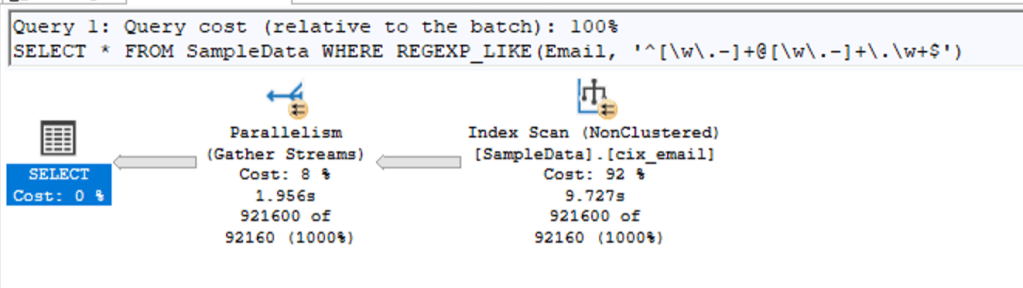
(921600 rows affected)
Table 'SampleData'. Scan count 9, logical reads 9284,

 SQL Server Execution Times:
   CPU time = 66188 ms,  elapsed time = 10638 ms.
SQL Server parse and compile time:
   CPU time = 0 ms, elapsed time = 0 ms.
As you can see from the time result, there were 66 seconds spent on the processor, but it took 10 seconds to complete. Hello parallelism! Now we’re getting somewhere as this makes more use of all the power of SQL Server.
From this point on, you can identify all the invalid addresses and proceed with your work accordingly.
So, bad?
No, definitely not! I think it’s a great addition to SQL Server to be able to do regular expressions and validate data. The technical implementation is valid and works. Yes, it is slower (in RC0) than other options, but when you compare the possibilities of regex with T-SQL, you’ll find that regex can do (much) more.
Does it fit in a data warehouse? Well, maybe. I think data validation should be performed when the data is received, in the source system. My test processed 1 million email addresses in 40 seconds. If you have to do that every minute, it’s a big issue. If you have to do this once a day, well, maybe not so much of an issue.
In most modern interfaces, checks like these are done in the front-end. Even before I’m able to save my information, a check is done and screams in red letters to me that I made a mistake. But there are many other checks that can be executed in the ETL process. In these cases, using the now built-in regular expressions can be a good thing. If only to avoid all the issues with Common Language Runtime (CLR) objects or xp_cmdshell to run code outside of SQL Server.
 Reitse's blog
One thought on “SQL Server 2025: Simplifying Data Checks with RegEx”