
Last week, I had the pleasure of attending the Microsoft Fabric Community Conference (FabCon) in Vienna. Four days of learning, networking, meeting new people, speaking, announcements, Power Hour, volunteering and charity.
I’ll cover all these aspects in this post. The updates part won’t cover all of them, as there are many. I’ll pick my favourites and show you where to find all of the updates.
Volunteering and charity
As FabCon focuses on the community but also wants to give something back to the local community, they’re always looking for volunteers to help out. I was involved in the giving back campaign and handing out swag. The campaign meant packing bags of sanitary items for the homeless people in Vienna. The plan is that we, as volunteers, coordinate and lead by example, and the attendees can jump in to pack one or more bags. Some people missed the briefing and felt that they could take it home, but most understood it after the explanation.
My second shift in the community lounge meant I was giving out some special swag. When attendees visit a booth in the community lounge, they get a sticker. This sticker gave them permission to collect a keychain with a lucky charm. Fun to do and an excellent opportunity to meet people, and to my great surprise, even some readers of this blog! Thank you for stopping by!
Announcements
I know this is why you clicked on the link, the announcements. There were many during the conference, both in the keynote and during some core sessions on the technology.
The first thing that caught my eye was the new layout of the Fabric portal. There are tabs at the top of the portal that display the items you’ve opened.

These are colour-coded to keep the different workspaces visually separated. On the left, you can open up to 10 different workspaces simultaneously to enhance your efficiency. A huge step forward in my opinion.
Power BI
There are several Power BI announcements where my coworker told me that creating and editing semantic models in the portal was a significant update. As I don’t work with Power BI, I recommend that you look at the blogs of specialists in this area, such as Marc Lelijveld.
Microsoft SQL
There was a lot of talk around SQL Server 2025, which has just released Release Candidate (RC) 1. If you’ve tried RC 0, you can upgrade to RC 1 and, after reading the release notes, see if there are improvements or things you were missing. Don’t forget, this is the best moment to provide feedback! Additionally, although it may get lost in the noise surrounding Fabric, it remains a major player in the data world. And it continues to show improvements that I’ve blogged about recently.
I’m also hoping for some good news on the improvements to the Fabric SQL Database. Fabric will also see support for Cosmos DB if you’re into NoSQL.
Data Warehouse
Upon reading the blog post, a significant number of updates and improvements are announced. When it comes to SQL parity, the merge statement and identity insert are two long-awaited features. No matter your opinion on them, I strongly feel they should be there, as both are also available in a ‘regular’ SQL environment.
The Warehouse Migration Assistant is now Generally Available (GA) and helps move from the Synapse SQL Dedicated Pools to Fabric Warehouse.
Real-Time Intelligence
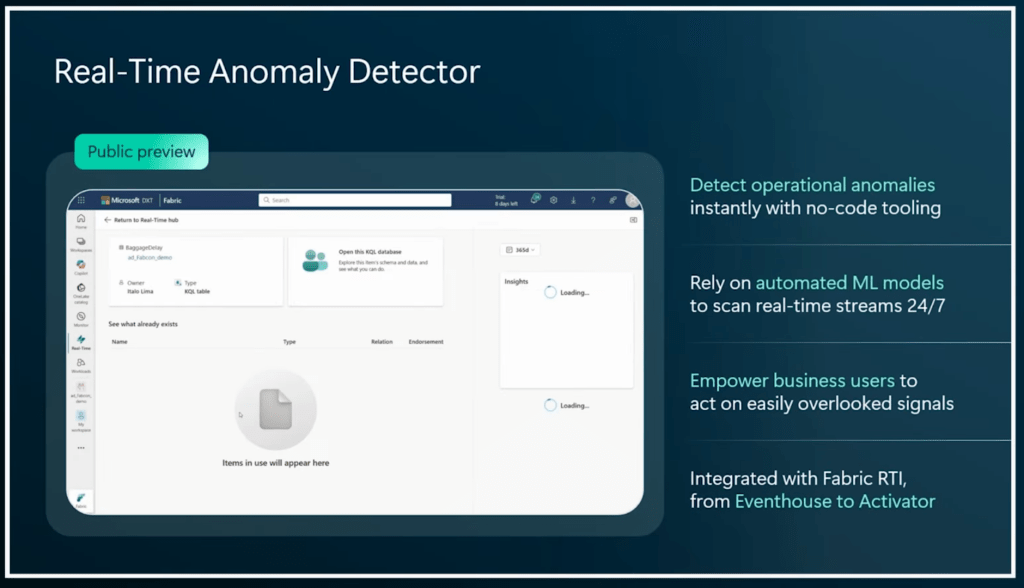
As this is a feature we’re using more and more, I was very stoked to see what news would be shared. Most of the news revolved around the integration of AI within RTI. Another cool announcement is the preview of the Anomaly detector, a tool that enables you to quickly detect and take action on discrepancies in your real-time data streams and tables.
Spark
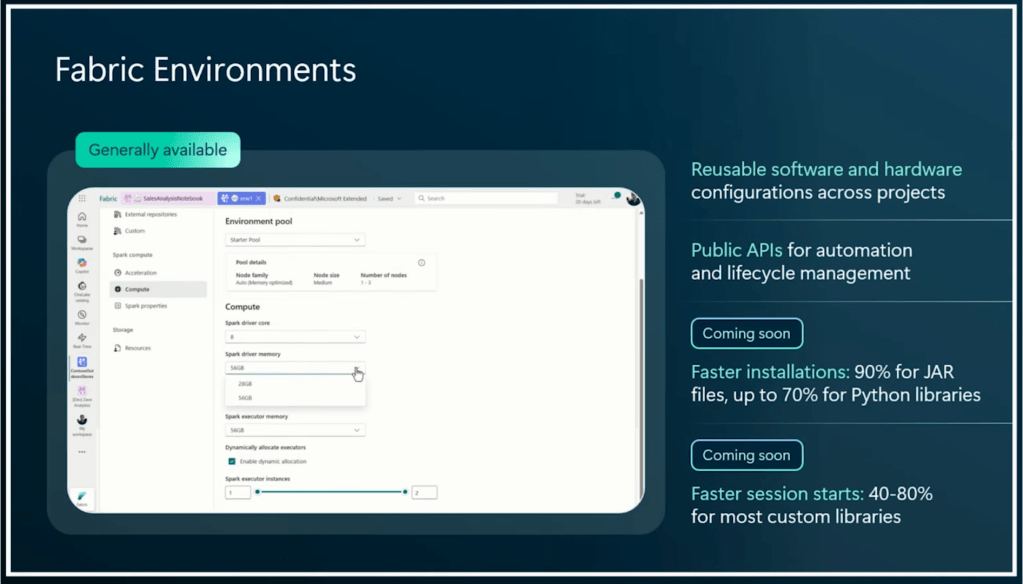
There were some notable announcements, indeed! Fabric Environments are GA, and will see some improvements coming shortly.
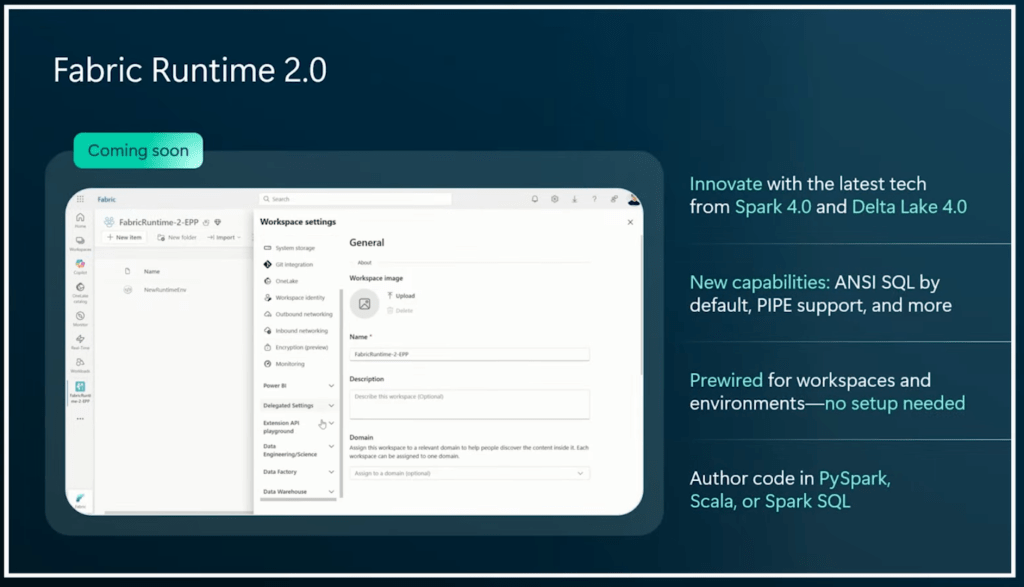
But more importantly, Fabric Runtime 2.0 is coming soon with support for Spark 4.0 and Delta Lake 4.0
Graph
No, not the graph API, but actual graphs to navigate through your data. I’m really curious to see how this one pans out and what we can use it for. It can work on all the data in your OneLake; it’s not confined to a Lakehouse, Warehouse or Eventhouse. At the time of writing, there’s no documentation available.

Dataflow Gen2 updates!
I’ve always had mixed feelings about these. Personally, I’m not a fan of low-code experiences, as they usually create unnecessary overhead. I prefer to be in control of what happens, and yes, I have made quite a few mistakes. As we all do. But the major issues I have with Dataflow Gen2 are cost and performance. Apparently, I wasn’t the only one because Microsoft improved both performance and the cost model of this item.
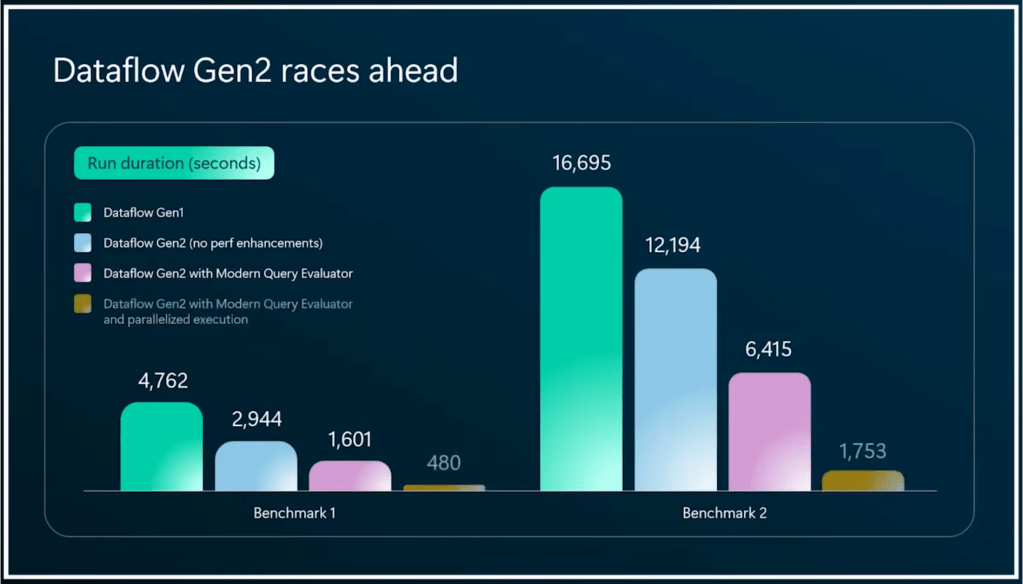

When I see this available in my tenant, I’ll give it a run and report back!
There are many more announcements, but you probably don’t want to read them all. You’re modern and want to see the videos. Here you go!
Meeting people
One of the most important aspects, yet often overlooked, is meeting people. There are a lot of opportunities, from the community zone to the expo hall, the ‘meet the expert’ booths, or just running into people in the hallway.
For me, this is the most valuable part of a conference: meeting people, listening to their views on various topics, or simply catching up. Of course, the sessions provide the raw content and knowledge, but ultimately, just like your work, it’s all about people.
Speaking
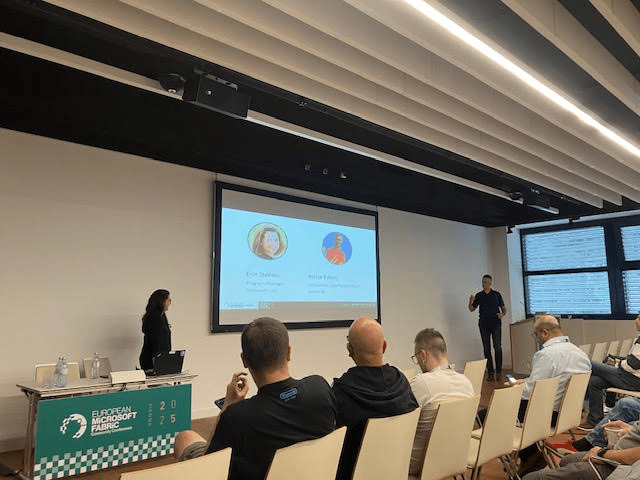
I was delighted to present a joint session with Erin Stellato on Copilot for SQL. We covered all the experiences (Azure Portal, VS Code, Fabric and SSMS) and did all demos (apart from one) live. When you think an hour is a lot of time, think again. We just made it. The feedback told us that attendees wanted even more demos and a longer session. Things to take with us for future endeavours. With 80-100 people in the room, we had a good interaction and questions. Most importantly, we all had fun!
More to come?
Always. Microsoft isn’t exactly sitting still. Additionally, I highly recommend visiting there next year. It’s in Barcelona, at the end of September.
Keep an eye on the Microsoft Fabric updates blog for the latest updates, and don’t forget to take a look at the roadmap! Combined, both websites should provide a comprehensive overview of everything that’s happening and upcoming.
 Reitse's blog
Good afternoon Reitse,
I attended a session held by you and Erin Stellato at the MS Fabric Conference. It was an incredibly informative and insightful session.
I am presently in the process of determining how to execute SQL queries in VS Code with Copilot enabled in order to provide support. We trust that this will be beneficial to non-SQL users in their efforts to develop more high-quality code for Power BI.
Is there any documentation on the Microsoft website that you may be aware of that could help me configure Copilot to be actively available only to the users of the company?
Kind Regards
LikeLike
Hi Erasmus,thank you for your kind words!
You could start out by looking at the scenarios published here: https://learn.microsoft.com/en-us/ssms/copilot/copilot-in-ssms-scenarios?wt.mc_id=MVP_311370
Even though it’s aimed at SSMS Copilot, it holds true for VSCode as well. The thing is, my results using copilot to generate SQL are a little better using SSMS copilot as it’s more aware of the database. Your mileage may vary but with SSMS 22 supporting GitHub Copilot, it may just work for you.
Let me know if you need something else!
LikeLike