
Today was a very interesting day at a customer’s site, where I had some trouble determining why the OneLake security wasn’t functioning as I expected. Spoiler alert: a part was me, and a part had to do with setting up my testing account.
Setup
The reason I got myself into this little pickle was quite simple. The customer wanted to see a demo of OneLake Security’s capabilities and setup in their own environment.
To help them out, and as part of the proof of concept, we built a fact table, two dimension tables, and shortcutted several other dimension tables.
To demonstrate the working of OneLake security, I enabled the feature and created a restricted role. This role has no access to one of the two dimension tables and limited access (both row and column level restrictions) on the other dimension table.
Testing
With the various restrictions in place, the first step is to test the outcome.
Using my second account at the customer, which I’ll call a happy accident, I attempted to access the data. My expectation was that I would see a limited dataset in both the Lakehouse view and when using the SQL endpoint.
The net result:
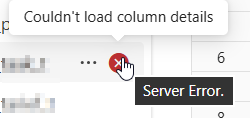
The data does not appear in the Lakehouse view, and the table displays an error. The table that shouldn’t be visible to the user isn’t visible. But when using the SQL endpoint, everything is visible and queryable.
At first, I was convinced it had something to do with my account, because when you read the docs, there are limitations on this feature. As a workspace admin, you have access to the data.
However, after changing the permissions to ‘reader’, the same data remained visible.
Solution
After conducting some research and receiving great help from Microsoft, I discovered a setting on the SQL endpoint that only becomes visible when OneLake security is enabled.
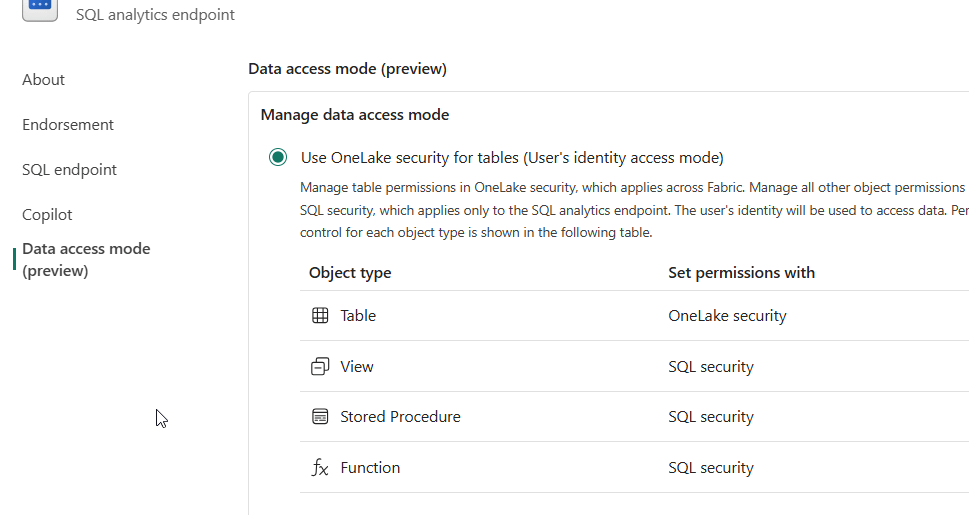
To find these settings, you have to go into your workspace and open the SQL Endpoint properties. Here, you can change the setting to Use OneLake security.
After setting this radio button, leaving this dialogue and allowing a minute, I saw the correct results. At least, I could only return columns and rows from the table that were inside the role definition; other columns returned this error:
The SELECT permission was denied on the column ‘ColumnName’ of the object ‘TableName’, database ‘LH_Presentation’, schema ‘dbo’.
The only thing that bothered me was that I lost sight of my shortcut tables. After some investigation, with the very kind help of the customer, we found that my testing account didn’t have permissions on the Lakehouse where the original tables are housed.
I also found that there’s an order applied to column- and row-level security. When you create a row-level security rule, you can only use the following syntax:
SELECT *
FROM [TableName]
WHERE [YourFilterPredicate]
As the SELECT * is executed without error, this is applied before the column-level security is used.
So, all good?
Well, I do have some suggestions.
- Should you do a SELECT * from a table with column-level security, you will get an error message showing each column you’re not allowed to access. In some cases, the name of the column can hold sensitive information. For instance, what if a bad actor has limited access to where credit card numbers are hidden, but the error message reveals their presence? This might spike their interest.
- If you click on the table in the SQL Endpoint view or the Lakehouse view, you get an error, where it would be nicer to just see the data you have permissions for
- When you create a row-level security rule, you can’t use joins to other tables. This might add complexity when filtering your fact tables.
- When you open the table in the Lakehouse view, you receive a general error message code, accompanied by no text, which will likely be difficult for regular end users to understand.
If you agree, please vote for the open ideas:
Preview!
One thing to keep in mind is that this technology is in preview, and I’ve found Microsoft to be very receptive to feedback. Use your voice by providing feedback through the feedback portal. Make your suggestions known to the team working on this project to help them create something that will stand the test of time. And of CSOs.
 Reitse's blog
One thought on “Microsoft Fabric Lakehouse OneLake security, some experiences”