
I’ve been working for quite some time on a fun solution in Fabric Realtime Intelligence. We’re processing XML files into a structured table. As you’re probably aware, XML has its own… well, let’s be nice and call them challenges.
One thing I ran into was that an element contained several other elements. Usually, you’ll see them in an array, but in this case, it wasn’t. Since these elements within the main element contain the information we need for the table, I started thinking about how to extract this data.
As a very simplified example, check out this XML.
<?xml version="1.0" encoding="UTF-8"?>
<MainElement>
  <SubLevel>
    <number>1</number>
    <type>Type 1</type>
  </SubLevel>
  <SubLevel>
    <number>5</number>
    <type>Type 2</type>
  </SubLevel>
  <SubLevel>
    <number>10</number>
    <type>Type 3</type>
  </SubLevel>
</MainElement>
As you can see, inside the main element, there are three identical sublevels, all with the same name but with different content.
So, all XML code?
Well, some time ago, I got the hint that when you’re parsing XML in Fabric Realtime, after the first pass, it’s no longer XML, but it’s JSON in the background. And with JSON, it can be a bit easier to work with elements. But still, if the XML is quirky, so will the JSON.
Funny discovery!
When I was trying to figure out how to get all these separate elements, I decided to take a look at what was actually on offer. And to my great surprise, my separate XML elements had been transformed into a JSON array, allowing me to unnest it and access all the good data inside.
When you run the following code, you’ll see the XML output.
let XML = datatable(XMLG:string) ['<?xml version="1.0" encoding="UTF-8"?><MainElement><SubLevel><number>1</number><type>Type 1</type></SubLevel><SubLevel><number>5</number><type>Type 2</type></SubLevel><SubLevel><number>10</number><type>Type 3</type></SubLevel></MainElement>'];
XML

Now, let’s add one row of code to parse the XML.
let XML = datatable(XMLG:string) ['<?xml version="1.0" encoding="UTF-8"?><MainElement><SubLevel><number>1</number><type>Type 1</type></SubLevel><SubLevel><number>5</number><type>Type 2</type></SubLevel><SubLevel><number>10</number><type>Type 3</type></SubLevel></MainElement>'];
XML
| extend data = parse_xml(XMLG)
| project data
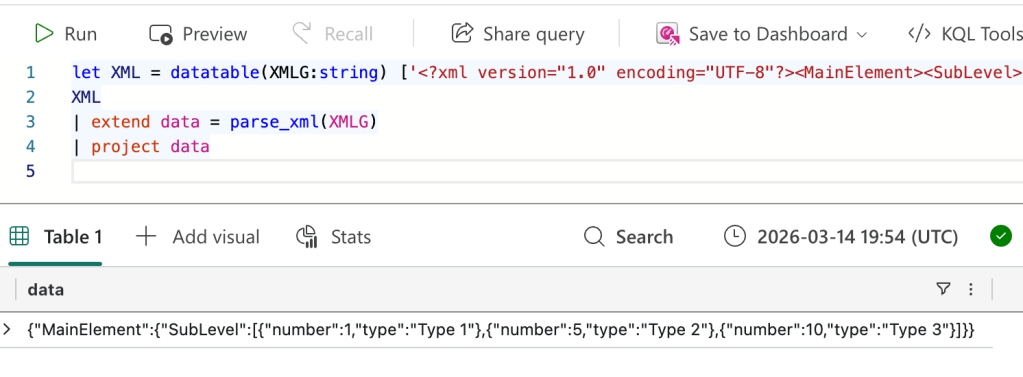
Now, you’ll see the XML has been converted to JSON. The most important part is that the engine recognises that there’s an array of sublevels and returns it as an array. You’ve seen that these aren’t offered as an array in the XML! Good job! And now, I can process the values to match the business rules or whatever the use case is.
The point
Whenever you ingest data through Realtime Intelligence in Fabric, check the intermediate steps before you venture off into writing a lot of code. Before you know it, there might be some data that can be easily manipulated.
Thanks for reading!
 Reitse's blog
One thought on “Microsoft Fabric Realtime Intelligence: Processing XML, or are you?”