
In a previous blog, I wrote about processing XML and that it’s actually JSON after the first pass. So far, so good. But then I found out that not all data was returned.
That’s weird because it’s really there. So, what’s happening here?
Follow me, and let’s find out!
The previous blog had this JSON as output:
{"MainElement":{"SubLevel":[{"number":1,"type":"Type 1"},{"number":5,"type":"Type 2"},{"number":10,"type":"Type 3"}]}}
Now, when we want to get all the rows, you might use logic like this:
let XML = datatable(XMLG:string) ['<?xml version="1.0" encoding="UTF-8"?><MainElement><SubLevel><number>1</number><type>Type 1</type></SubLevel><SubLevel><number>5</number><type>Type 2</type></SubLevel><SubLevel><number>10</number><type>Type 3</type></SubLevel></MainElement>'];
XML
| extend data = parse_xml(XMLG)
| extend full = parse_json(data.MainElement)
| extend sl = parse_json(full.SubLevel)
| project sl.number
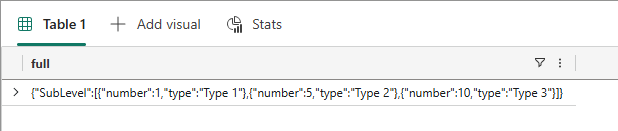
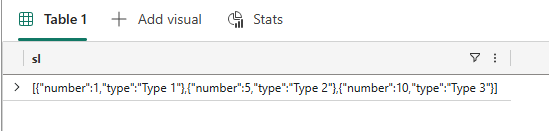
This code works through the elements. First, we parse the XML to morph it into JSON. Next, we open the MainElement to what is inside, and then we’re going to the sublevels.
These look like this:
And now, let’s get the number:
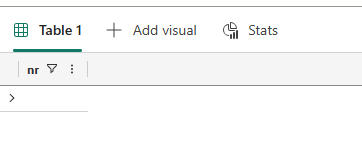
Well, this is a problem. Even though we saw the data in the JSON, it won’t appear.
Let’s fix it!
When I ran into this issue, it took some time to fix it. And I know you’re here for the solution, let’s do it!
let XML = datatable(XMLG:string) ['<?xml version="1.0" encoding="UTF-8"?><MainElement><SubLevel><number>1</number><type>Type 1</type></SubLevel><SubLevel><number>5</number><type>Type 2</type></SubLevel><SubLevel><number>10</number><type>Type 3</type></SubLevel></MainElement>'];
XML
| extend data = parse_xml(XMLG)
| extend full = parse_json(data.MainElement)
| extend sl = parse_json(full.SubLevel)
Yup, this part is something you’ve already seen.
Now, I found that you can check the type of array:
| extend arrType = case(
        gettype(sl) == "array", sl,                                              // already an array
        gettype(sl) == "dictionary" and gettype(sl["items"]) == "array", sl["items"], // object that contains the array
        pack_array(sl)                                                           // single object/scalar -> wrap as 1-element array
)
In this code, I’m feeding the JSON into a function that determines the type. If it is an array, all good. If it’s not recognised as an array, it will pack the data into an array object, effectively creating an array we can work with.
| mv-expand item = arrType
| project nr = item.number,
        tp = item.type
Next, I’m expanding the array from the type checking, followed by projecting these values. The result?
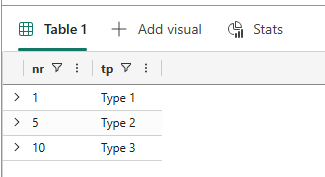
If you’re interested, you can also see the different steps by skipping the project lines.

You can see that the code is expanding the data in a way that it can be processed, something I couldn’t achieve without the extra step of extending the array.
So, always through this type?
Well, not necessarily. Look at the following code:
let XML = datatable(XMLG:string) ['<?xml version="1.0" encoding="UTF-8"?><MainElement><SubLevel><number>1</number><type>Type 1</type></SubLevel></MainElement>'];
XML
| extend data = parse_xml(XMLG)
| extend full = parse_json(data.MainElement)
| extend sl = parse_json(full.SubLevel)
| project nr = sl.number,
          tp = sl.type
This is a fully single-element XML. When running this code, this is the result
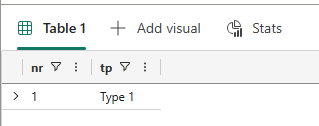
This also works with the extended code:
let XML = datatable(XMLG:string) ['<?xml version="1.0" encoding="UTF-8"?><MainElement><SubLevel><number>1</number><type>Type 1</type></SubLevel></MainElement>'];
XML
| extend data = parse_xml(XMLG)
| extend full = parse_json(data.MainElement)
| extend sl = parse_json(full.SubLevel)
| extend arrType = case(
        gettype(sl) == "array", sl,                                              // already an array
        gettype(sl) == "dictionary" and gettype(sl["items"]) == "array", sl["items"], // object that contains the array
        pack_array(sl)                                                           // single object/scalar -> wrap as 1-element array
)
| mv-expand item = arrType
|project nr = item.number,
        tp = item.type
The result is identical. The main difference is that the last code fragment is robust to one or more elements, whereas the simpler code can only handle a single element.
And now you know, and maybe you can improve your code even further. Also, this may not be the best or the only solution. Please add your solution in the comments if you have something else that works!
Enjoy KQL, and thanks for reading!
 Reitse's blog