

In today’s cloud era, Azure SQL is usually first with new functionality, while on-premises SQL Server follows. One of the new things is the JSON data type and accompanying JSON index.
Because I had to learn how JSON works in SQL Server for my DP-800 exam, I decided to see how the JSON index works and when it works. I’ll go into the execution plans, some details, and check out the statistics when a query runs. Just so you know, this is much deeper than the certification requires, so no need to get this all in your head for the exam.
Setup
For this demo, I’m using my database for flight data. There’s nothing secret in here; it contains the name, location and IATA codes of airports.
My table only contains regular data; I had to alter the table to add a JSON column, then insert data in JSON format.
ALTER TABLE DIM.AIRPORT
ADD  AirportJson JSON NULL;
GO

UPDATE DIM.AIRPORT
SET AirportJson = JSON_QUERY(
	CONCAT(
		'{',
		'"DIM_AIRPORT_ID":', DIM_AIRPORT_ID, ',',
		'"IATA":"', IATA, '",',
		'"AIRPORT_NAME":"', AIRPORT_NAME, '",',
		'"LATITUDE":', LATITUDE, ',',
		'"LONGITUDE":', LONGITUDE, ',',
		'"DIM_LOCATION_ID":', DIM_LOCATION_ID, ',',
		'"CREATE_DATE":"', FORMAT(CREATE_DATE, 'yyyy-MM-ddTHH:mm:ss'), '",',
		'"CHANGE_DATE":"', FORMAT(CHANGE_DATE, 'yyyy-MM-ddTHH:mm:ss'), '",',
		'"DELETE_DATE":"', FORMAT(DELETE_DATE, 'yyyy-MM-ddTHH:mm:ss'), '"',
		'}'
	)
	);
GO
This JSON has no root element nor nested arrays. I wanted to keep things as simple as possible. To give it some body, I just added all the columns. Do not do that in a real environment; select the columns you need for the use case.
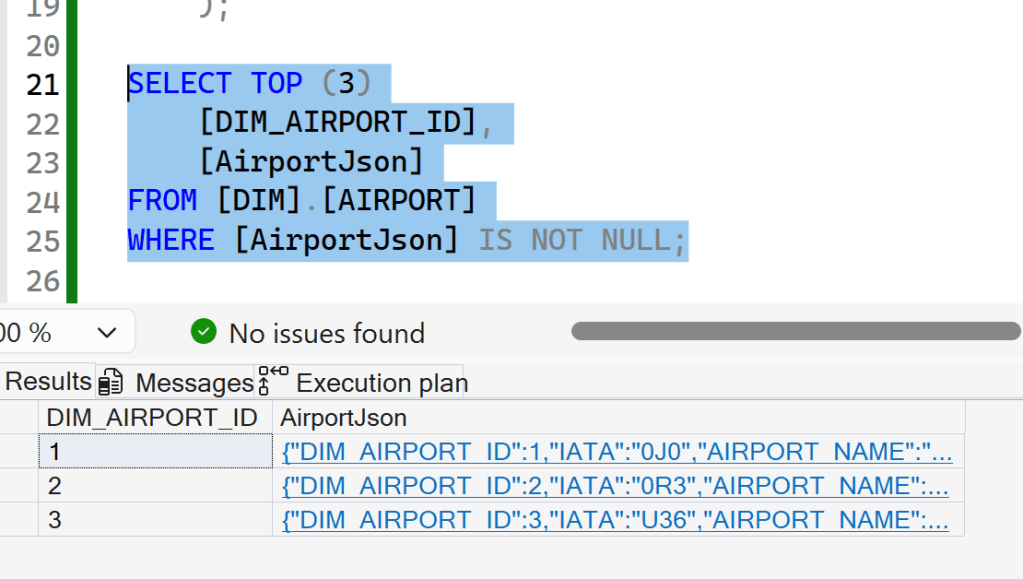
Here’s a screenshot of the data:
Next, I wanted to create an index on the JSON column to see how it works.

Well, this error was a bit unexpected at first, until I read the message better. The index requires a clustered primary key. My table has a clustered index and a non-clustered primary key. And that combination clearly does not work.
Fix the error.
Because I also wanted to compare performance, I decided to create a copy of the table with the correct indexing instead of changing the database structure.
SELECT *
INTO DIM.AIRPORT_JSON
FROM DIM.AIRPORT;
GO

ALTER TABLE [DIM].[AIRPORT_JSON]
ADD CONSTRAINT [PK_AIRPORT_JSON_DIM_AIRPORT_ID]
PRIMARY KEY CLUSTERED ([DIM_AIRPORT_ID]);
GO

-- Step 3: Create JSON indexes
CREATE JSON INDEX [ix_airport_json_iata]
ON [DIM].[AIRPORT_JSON] ([AirportJson])
FOR ('$.IATA');
GO
All these commands succeeded.
Let’s see how it works.
One thing to be aware of is that your database needs to be in SQL Server 2025 compatibility mode. If it’s not, your statements will succeed (on my Azure DB at least they did), but the optimiser will not use the JSON index. It took me some time to realise that I had to set the compatibility level of my Azure SQL Database to 2025.
Hit the Index.
Let’s see a very limited query, fully aimed at hitting the JSON index.

First, I’m by and far NOT Hugo Kornelis, who can dig way deeper than I can and explain this plan much better than I ever could. [update 17-07-2026: Hugo created a blogpost on this topic, click here to read that]
From what I understand of the execution plan, there’s an Index Seek on my predicate (but it still goes through all the rows). It then hits the Clustered Index to find the correct row. The compute scalar then executes the JSON_VALUE command in the SELECT list to retrieve the IATA code.
The warning is on a data type conversion:
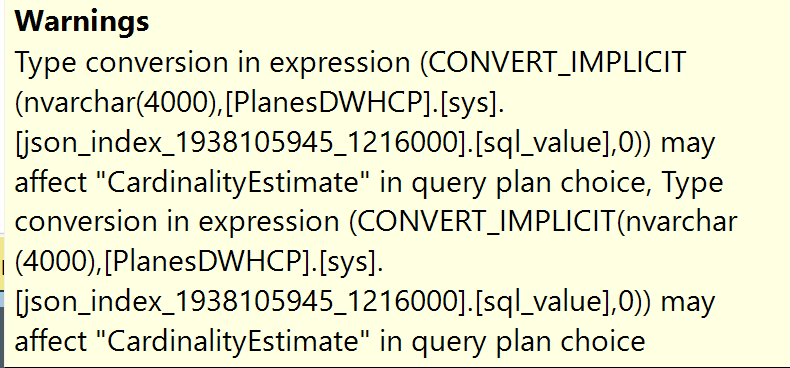
When checking the column, it shows JSON as the column type; it looks like the data is stored as NVARCHAR(4000), which also indicates the maximum length of the stored JSON string.
Different query, same result?
The query plan doesn’t change when I include more columns from the source table.

No more filtering then!
But things change when I remove the WHERE clause!

As usual, there’s a query cost, but let’s see the difference between having an index and not having one. Because the number itself doesn’t mean that much. Just as you would do with query tuning, you start comparing results; are things improving?
Dig into the differences.
I started by executing both queries to see the differences in the execution plans.
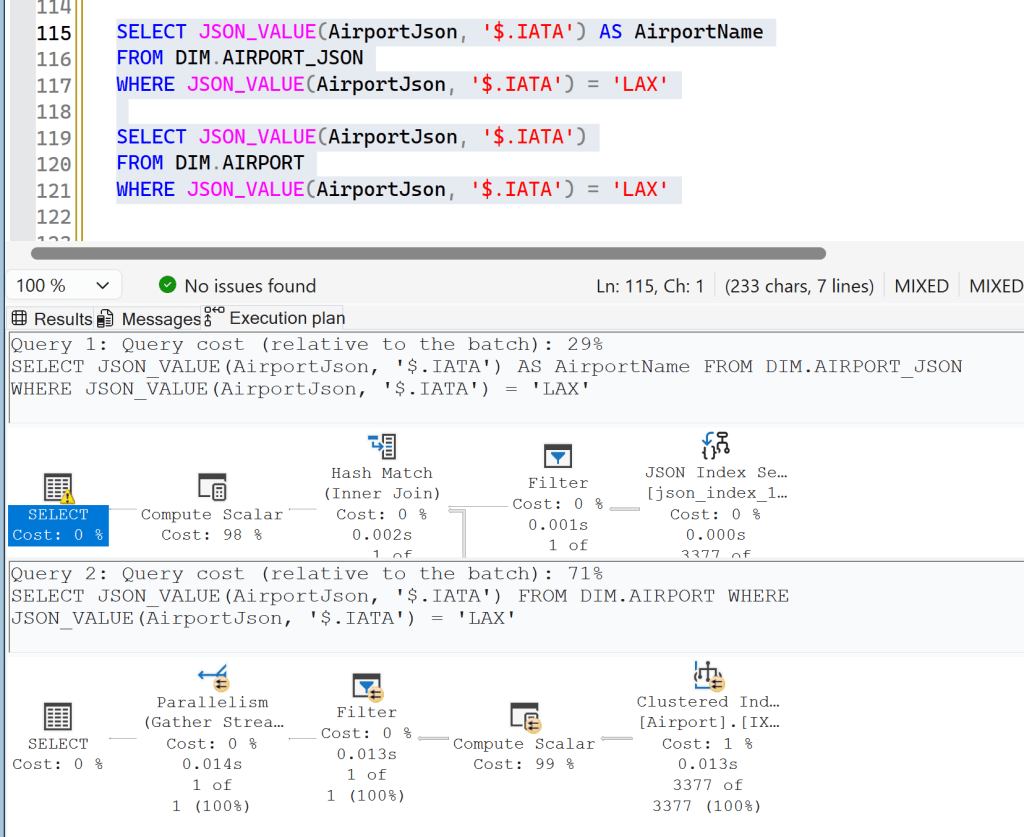
Let’s compare the cost, CPU usage, and memory usage. You can do this by pressing F4 to open the properties window in SSMS, then clicking the operator you want to learn more about. If you’re really hardcore, you can also right-click in the execution plan and select the XML output.


So, with an index, the plan goes serial, requesting 1,7 MB of memory, costing 14.4795. Without it, it runs in parallel across 8 cores, only needs 136 KB of memory, but costs 35.9657.
Hello statistics!
Let’s check out the statistics; you can disclose them by running SET STATISTICS TIME, IO ON; in your query window. You then get the output as shown below, though I cleaned it up a bit. All the output that was 0 has been removed to make it easier to read.
SQL Server parse and compile time:
   CPU time = 0 ms, elapsed time = 0 ms.

(1 row affected)
Table 'Workfile'. Scan count 0
Table 'Worktable'. Scan count 0
Table 'AIRPORT_JSON'. Scan count 1, logical reads 203
Table 'json_index_1938105945_1216000'. Scan count 1, logical reads 9

 SQL Server Execution Times:
   CPU time = 0 ms,  elapsed time = 3 ms.
SQL Server parse and compile time:
   CPU time = 0 ms, elapsed time = 2 ms.

(1 row affected)
Table 'Airport'. Scan count 9, logical reads 1150

 SQL Server Execution Times:
   CPU time = 0 ms,  elapsed time = 15 ms.
Here, you can see that the index query is 5 times faster (in elapsed time) and has far fewer reads. Which are good things!
Does this change with the changes I made in the query shown earlier?

Adding or removing columns makes no difference, but removing the WHERE clause did. Let’s see those numbers.

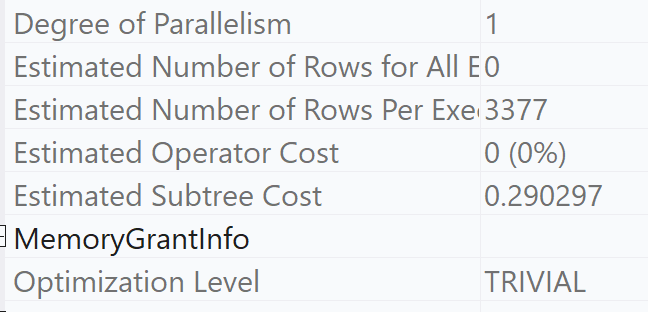
Now, the plans are somewhat the same, both going serial. But the plan without the JSON index is much cheaper compared to the plan with the index.
Operator properties then.
When you look at the execution plans, you can see that the compute scalar operators are shown as polar opposites: one at 0%, the other at 100%. Let’s see if we can find any more information there.
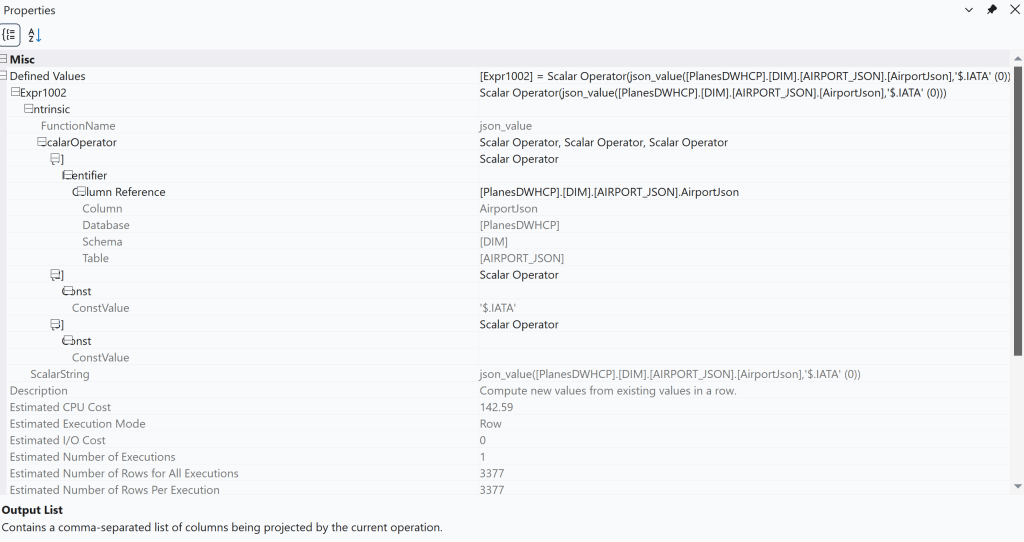

Now, when you examine these screenshots, the only differences you’ll see are the table name and the compute required; the CPU Cost.
The plan XML?
Let’s try to dig a level deeper and examine the plan XML. This can sometimes reveal more info than the graphical plan can. Sadly, the XML is very simple and doesn’t show many differences beyond names, IDs, and some I/O. But nothing that can explain the huge differences in numbers, even though it’s fast on both occasions.
If you like, you can dig in yourself; I’ve included the full XML at the end of this blog post.
Statistics again, please
So, final try: let’s look at the statistics.
SQL Server parse and compile time:
   CPU time = 0 ms, elapsed time = 1 ms.

(3377 rows affected)
Table 'AIRPORT_JSON'. Scan count 1, logical reads 203

 SQL Server Execution Times:
   CPU time = 0 ms,  elapsed time = 5 ms.
SQL Server parse and compile time:
   CPU time = 0 ms, elapsed time = 1 ms.

(3377 rows affected)
Table 'Airport'. Scan count 1, logical reads 385

 SQL Server Execution Times:
   CPU time = 0 ms,  elapsed time = 5 ms.
Not much of a difference to see here, other than that the original table has more reads,
Filtering on a non-indexed column?
As you probably noticed, I indexed a specific JSON column for my test. And my experiments were aimed at that specific column. But suppose a query uses a different column to filter on? Not an unusual situation.

The query plans look very similar. Let’s see if they really are.


There is a very slight difference between the two, but very small. Let’s check the statistics.
SQL Server parse and compile time:
   CPU time = 0 ms, elapsed time = 1 ms.

(1 row affected)
Table 'AIRPORT_JSON'. Scan count 9, logical reads 604

 SQL Server Execution Times:
   CPU time = 0 ms,  elapsed time = 10 ms.
SQL Server parse and compile time:
   CPU time = 0 ms, elapsed time = 1 ms.

(1 row affected)
Table 'Airport'. Scan count 9, logical reads 1150

 SQL Server Execution Times:
   CPU time = 32 ms,  elapsed time = 17 ms.
Just as we’ve seen before, the table with the JSON Index has a slight advantage over the non-indexed one; fewer reads and somewhat quicker.
What’s better?
Good question; maybe it just depends. If you select a large amount of data from your JSON column but aren’t pre-selecting it, a regular table can be a better choice. But when you start filtering the data, having a JSON Index can really help! This means you have to review the queries you’re running and decide if the JSON Index is worth it. In the end, this isn’t much different from regular indexing work, because an extra index can also work against you.
Test, validate, tune, put into production (or not), and review. The never-ending loop of performance tuning.
Oh, and if you’re really fanatic, here’s the XML.
<?xml version="1.0" encoding="utf-16"?>
<ShowPlanXML xmlns:xsd="http://www.w3.org/2001/XMLSchema" xmlns:xsi="http://www.w3.org/2001/XMLSchema-instance" Version="1.604" Build="18.0.131.215" xmlns="http://schemas.microsoft.com/sqlserver/2004/07/showplan">
<BatchSequence>
<Batch>
<Statements>
<StmtSimple StatementCompId="1" StatementEstRows="3377" StatementId="1" StatementOptmLevel="FULL" CardinalityEstimationModelVersion="170" StatementSubTreeCost="142.745" StatementText="SELECT JSON_VALUE(AirportJson, '$.IATA') AS AirportName
FROM DIM.AIRPORT_JSON" StatementType="SELECT" QueryHash="0xC4952C6D15794649" QueryPlanHash="0xF30A3CA83E28D392" RetrievedFromCache="true" StatementSqlHandle="0x0900C08F4F29D8361A4CF590BAB81C75D9A10000000000000000000000000000000000000000000000000000" DatabaseContextSettingsId="3" ParentObjectId="0" StatementParameterizationType="0" SecurityPolicyApplied="false">
<StatementSetOptions ANSI_NULLS="true" ANSI_PADDING="true" ANSI_WARNINGS="true" ARITHABORT="true" CONCAT_NULL_YIELDS_NULL="true" NUMERIC_ROUNDABORT="false" QUOTED_IDENTIFIER="true" />
<QueryPlan DegreeOfParallelism="1" CachedPlanSize="16" CompileTime="1" CompileCPU="1" CompileMemory="216">
<MemoryGrantInfo SerialRequiredMemory="0" SerialDesiredMemory="0" GrantedMemory="0" MaxUsedMemory="0" />
<OptimizerHardwareDependentProperties EstimatedAvailableMemoryGrant="314572" EstimatedPagesCached="157286" EstimatedAvailableDegreeOfParallelism="4" MaxCompileMemory="16665520" />
<QueryTimeStats CpuTime="4" ElapsedTime="4" />
<RelOp AvgRowSize="4011" EstimateCPU="142.59" EstimateIO="0" EstimateRebinds="0" EstimateRewinds="0" EstimatedExecutionMode="Row" EstimateRows="3377" LogicalOp="Compute Scalar" NodeId="0" Parallel="false" PhysicalOp="Compute Scalar" EstimatedTotalSubtreeCost="142.745">
<OutputList>
<ColumnReference Column="Expr1002" />
</OutputList>
<ComputeScalar>
<DefinedValues>
<DefinedValue>
<ColumnReference Column="Expr1002" />
<ScalarOperator ScalarString="json_value([PlanesDWHCP].[DIM].[AIRPORT_JSON].[AirportJson],'$.IATA' (0))">
<Intrinsic FunctionName="json_value">
<ScalarOperator>
<Identifier>
<ColumnReference Database="[PlanesDWHCP]" Schema="[DIM]" Table="[AIRPORT_JSON]" Column="AirportJson" />
</Identifier>
</ScalarOperator>
<ScalarOperator>
<Const ConstValue="'$.IATA'" />
</ScalarOperator>
<ScalarOperator>
<Const ConstValue="" />
</ScalarOperator>
</Intrinsic>
</ScalarOperator>
</DefinedValue>
</DefinedValues>
<RelOp AvgRowSize="4035" EstimateCPU="0.0038717" EstimateIO="0.151273" EstimateRebinds="0" EstimateRewinds="0" EstimatedExecutionMode="Row" EstimateRows="3377" EstimatedRowsRead="3377" LogicalOp="Clustered Index Scan" NodeId="1" Parallel="false" PhysicalOp="Clustered Index Scan" EstimatedTotalSubtreeCost="0.155145" TableCardinality="3377">
<OutputList>
<ColumnReference Database="[PlanesDWHCP]" Schema="[DIM]" Table="[AIRPORT_JSON]" Column="AirportJson" />
</OutputList>
<RunTimeInformation>
<RunTimeCountersPerThread Thread="0" ActualRows="3377" ActualRowsRead="3377" Batches="0" ActualEndOfScans="1" ActualExecutions="1" ActualExecutionMode="Row" ActualElapsedms="1" ActualCPUms="1" ActualScans="1" ActualLogicalReads="203" ActualPhysicalReads="0" ActualReadAheads="0" ActualLobLogicalReads="0" ActualLobPhysicalReads="0" ActualLobReadAheads="0" />
</RunTimeInformation>
<IndexScan Ordered="false" ForcedIndex="false" ForceScan="false" NoExpandHint="false" Storage="RowStore">
<DefinedValues>
<DefinedValue>
<ColumnReference Database="[PlanesDWHCP]" Schema="[DIM]" Table="[AIRPORT_JSON]" Column="AirportJson" />
</DefinedValue>
</DefinedValues>
<Object Database="[PlanesDWHCP]" Schema="[DIM]" Table="[AIRPORT_JSON]" Index="[PK_AIRPORT_JSON_DIM_AIRPORT_ID]" IndexKind="Clustered" Storage="RowStore" />
</IndexScan>
</RelOp>
</ComputeScalar>
</RelOp>
</QueryPlan>
</StmtSimple>
</Statements>
</Batch>
<Batch>
<Statements>
<StmtSimple StatementCompId="2" StatementEstRows="3377" StatementId="2" StatementOptmLevel="TRIVIAL" CardinalityEstimationModelVersion="170" StatementSubTreeCost="0.290297" StatementText="SELECT JSON_VALUE(AirportJson, '$.IATA')
FROM DIM.AIRPORT" StatementType="SELECT" QueryHash="0xC153BEA4010E3ABC" QueryPlanHash="0xAA5C3DBB83E2DD4B" RetrievedFromCache="true" StatementSqlHandle="0x09009D63479DC7A3DE11EEAF2EEFD5B0E1E20000000000000000000000000000000000000000000000000000" DatabaseContextSettingsId="3" ParentObjectId="0" StatementParameterizationType="0" SecurityPolicyApplied="false">
<StatementSetOptions ANSI_NULLS="true" ANSI_PADDING="true" ANSI_WARNINGS="true" ARITHABORT="true" CONCAT_NULL_YIELDS_NULL="true" NUMERIC_ROUNDABORT="false" QUOTED_IDENTIFIER="true" />
<QueryPlan DegreeOfParallelism="1" CachedPlanSize="16" CompileTime="0" CompileCPU="0" CompileMemory="176">
<MemoryGrantInfo SerialRequiredMemory="0" SerialDesiredMemory="0" GrantedMemory="0" MaxUsedMemory="0" />
<OptimizerHardwareDependentProperties EstimatedAvailableMemoryGrant="314572" EstimatedPagesCached="157286" EstimatedAvailableDegreeOfParallelism="4" MaxCompileMemory="16665520" />
<QueryTimeStats CpuTime="5" ElapsedTime="5" />
<RelOp AvgRowSize="4011" EstimateCPU="0.0003377" EstimateIO="0" EstimateRebinds="0" EstimateRewinds="0" EstimatedExecutionMode="Row" EstimateRows="3377" LogicalOp="Compute Scalar" NodeId="0" Parallel="false" PhysicalOp="Compute Scalar" EstimatedTotalSubtreeCost="0.290297">
<OutputList>
<ColumnReference Column="Expr1003" />
</OutputList>
<ComputeScalar>
<DefinedValues>
<DefinedValue>
<ColumnReference Column="Expr1003" />
<ScalarOperator ScalarString="json_value([PlanesDWHCP].[DIM].[Airport].[AirportJson],'$.IATA' (0))">
<Intrinsic FunctionName="json_value">
<ScalarOperator>
<Identifier>
<ColumnReference Database="[PlanesDWHCP]" Schema="[DIM]" Table="[Airport]" Column="AirportJson" />
</Identifier>
</ScalarOperator>
<ScalarOperator>
<Const ConstValue="'$.IATA'" />
</ScalarOperator>
<ScalarOperator>
<Const ConstValue="" />
</ScalarOperator>
</Intrinsic>
</ScalarOperator>
</DefinedValue>
</DefinedValues>
<RelOp AvgRowSize="4035" EstimateCPU="0.0038717" EstimateIO="0.286088" EstimateRebinds="0" EstimateRewinds="0" EstimatedExecutionMode="Row" EstimateRows="3377" EstimatedRowsRead="3377" LogicalOp="Clustered Index Scan" NodeId="1" Parallel="false" PhysicalOp="Clustered Index Scan" EstimatedTotalSubtreeCost="0.28996" TableCardinality="3377">
<OutputList>
<ColumnReference Database="[PlanesDWHCP]" Schema="[DIM]" Table="[Airport]" Column="AirportJson" />
</OutputList>
<RunTimeInformation>
<RunTimeCountersPerThread Thread="0" ActualRows="3377" ActualRowsRead="3377" Batches="0" ActualEndOfScans="1" ActualExecutions="1" ActualExecutionMode="Row" ActualElapsedms="1" ActualCPUms="1" ActualScans="1" ActualLogicalReads="385" ActualPhysicalReads="0" ActualReadAheads="0" ActualLobLogicalReads="0" ActualLobPhysicalReads="0" ActualLobReadAheads="0" />
</RunTimeInformation>
<IndexScan Ordered="false" ForcedIndex="false" ForceScan="false" NoExpandHint="false" Storage="RowStore">
<DefinedValues>
<DefinedValue>
<ColumnReference Database="[PlanesDWHCP]" Schema="[DIM]" Table="[Airport]" Column="AirportJson" />
</DefinedValue>
</DefinedValues>
<Object Database="[PlanesDWHCP]" Schema="[DIM]" Table="[Airport]" Index="[IX_DIM_AIRPORT_ID]" IndexKind="Clustered" Storage="RowStore" />
</IndexScan>
</RelOp>
</ComputeScalar>
</RelOp>
</QueryPlan>
</StmtSimple>
</Statements>
</Batch>
</BatchSequence>
</ShowPlanXML>


One thought on “SQL Server 2025: Testing the JSON Index”