
This monday, I was lucky enough to attend the Fabric level 300 precon at dataMindsConnect. If you ever have the chance to go there, do it! It’s very well organised, the sessions are amazing and so are all the people there.
But that’s not what this blog is about; today a Twitter thread started on capacity usage between PowerBI and all the other moving parts.
Now I’m going to do something scary and try to explain some things. I tried to pay attention during the precon and had the pleasure of talking with Ljubica Vujovic Boskovic on the capacity usage. She, very patiently, helped me out where my mind completely lost all track. Her explanations were great, any errors are all mine and I will correct this blogpost if there are mistakes. If you want to know more, you can also read this blog by Chris Novak who digs a bit deeper into smoothing and bursting.
So let me give you a very quick and simple introduction into the capacity challenges we’re going to face.
Capacity
When you deploy Fabric, you need to select the capacity, the F2, F4, F8 and so on. This will not only give you compute power up to a certain level, but it also serves as a max compute you can use on a given moment in time.
If you need more power for a short amount of time, Fabric can ‘burst’ your compute power above the limit you’ve bought. This means you’re borrowing performance from the future. This results in less available compute later in the day. If you’ve reached your maximum at some point you will experience performance throttling, time-outs and a less joyful experience. This can be handled with either patience or upgrading your Fabric Capacity Units.
The thing is, what if you want it all at the same time.
Compute competition
In my line of work, there’s never just one resource working; reports are refreshed, new data is loaded and developers are building new ETL processes. Every moving part needs compute and at that point, buying one Fabric resource to serve them all won’t work anymore. Before we know it, an ETL process has gobbled up all the compute for the day and the other users will not be happy. So, you need to mitigate that. Maybe with a best practice?
Best practice
Well, there isn’t one. Yet. So let me give you my thoughts based on current knowledge. And let me emphasise that Fabric is still in preview! So things can, and most likely will, change. As a major part of my working role is being a solutions architect, I really like to create images.
To start with, you have to realise that a single tenant has a singe OneLake. This OneLake can have one or more Fabric Capacity resources attached to it. Every capacity resource can have one or more workspaces and each workspace can have multiple lakehouses, warehouses, datasets and reports. In the image, the latter are omitted for readability.
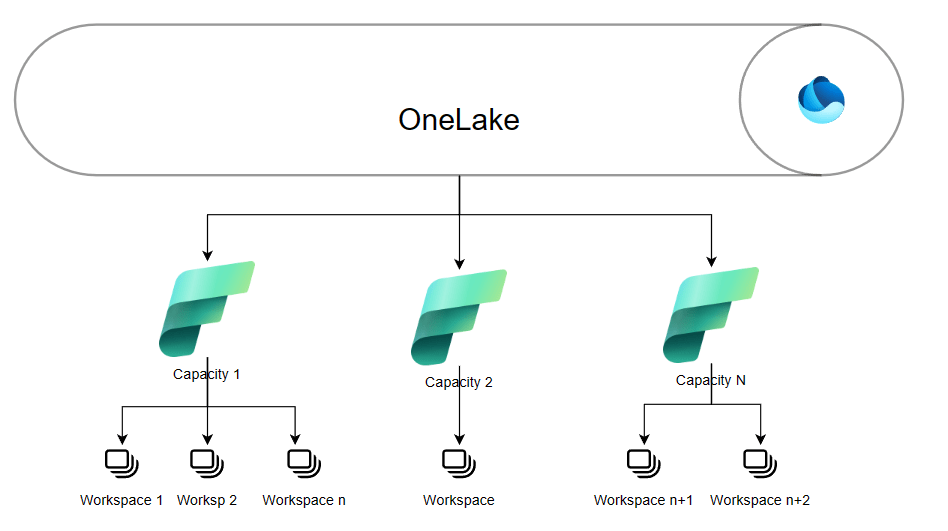
This image shows you the tree structure with the OneLake, Capacities and Workspaces.
This tree like structure can already help you in getting an idea; for instance I could provision a DevTest capacity that can be scaled (within limits) but will be offline during the night and weekends. This stops most of the cost and allows developers to their work without hampering QA and/or production.
Production can have it’s own dedicated capacity for all the data preparation, possibly more compute during the night when the heavy loads run and less during the day when only smaller updates are applied. And you could use it for reporting as well.
Now comes the trick, I think I’d provision a separate capacity for reporting. Why? In the end, all the work we’re doing has to result into reports. Those reports being throttled or timing out would be a bad thing. Especially if it happens at C-level. Reserving a separate capacity just for the reporting might solve that issue.
How to do that?
Good question! As far as I’ve experienced now (October 2023), you can create workspaces in a specific capacity. So, create the reporting workspace in it’s designated capacity, try and block all other resources from being deployed (honestly, no idea how to achieve that other than giving everyone reader role and only yourself admin (as you’re the only one to be trusted ;)). The sizing of the capacity has so many dependencies that I’m not going to elaborate on that.
In an image, it looks like this.
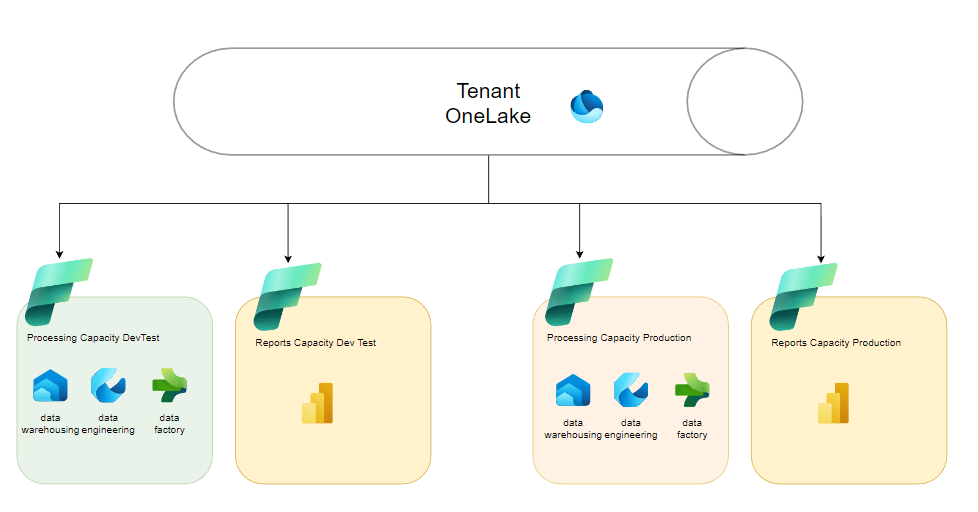
You have your tenant OneLake on the top with three capacity resources connected to it. One for DevTest, another capacity for production and separate ones for reporting.
I’ve omitted the workspaces for the sake of readability, but you can use a development and a testing workspace within the DevTest capacity. As far as reporting goes, you can use the reporting capacity for both DevTest reporting and a separate one for production. As I mentioned earlier, the DevTest capacities should be paused during non-working hours to save money. It should be clear that I’ve simplified to demonstrate the concept so you could also apply it to data science, real time analytics and combinations of these as well.
Next steps
Now, I just think of this sitting in front of a screen. I’m convinced that as a community, we should be able to come up with some sort of best practice or reference architecture. Let me know your thoughts, write your own blog, create your session on what you think could be the next step towards a best practice architecture.
If you want to use my drawings as a starting point for your own architecture, you can download them from this link.
Thanks for reading!
Updates
October 12 2023: typo and changed the second graph to include a capacity for DevTest reporting. Changed accompanying text accordingly. Thank you Koen Verbeeck (T | L) for your input!
 Reitse's blog
Thanks for the notes. It’s really helpful .How can I restrict my users not to create workspace with Trail Fabric license? Just to make sure that they don’t create trail capacity on their own.
LikeLike
Hi Subhash, apologies for the delayed reply. You can restrict this via the admin part of Fabric.
LikeLike
Very useful blog on MS Fabric Capacity Design!
LikeLike