

My previous post on load testing Azure SQL covered the Premium Edition; today I’m moving to the General Purpose Tier.
The GP tier comes in two flavours: regular and serverless. Serverless has only one hardware tier: Gen5. With provisioned, you can also select memory-optimised or confidential compute. In earlier tests, I never found significant differences between serverless and provisioned, so I skipped testing both SKUs. Given the nature of these tests, going memory-optimised didn’t seem to make much sense either. Also, I’ve never seen any other deployment than the regular Gen5 General Purpose database.
One thing to keep in mind: Microsoft has a lot going on with its roadmap. If you want to see what’s happening, follow this link: https://aka.ms/sqlroadmap
To make sure you understand the key terms, let me start by explaining them.
Terminology
Tier: the type of database. In Azure, you can choose Standard, Premium, General Purpose, Hyperscale, or Business Critical.
SKU: Stock Keeping Unit. In databases, it’s the number of DTUs or Cores you assign to the database. Database size (GB storage) isn’t part of the SKU, but you can set it separately.
These are the most important terms that keep coming back; let’s move on to the files I’ve used.
The files
I’ve been using a large set of files, and large files within that set. In total, around 500 GB of plain text data. This posed the first problem for the Standard Edition, because the S2 edition has a hard limit on how much data it can hold. This means that the results for this one are somewhat limited. All the other databases I tested could handle the full dataset.
If you want to learn more about the setup, click here!
Just loading files into the database doesn’t help; I need to measure things.
The measurements
The testing consists of two measurements. The first part is timing: how long it takes to load all the data into the database. Because I know the data size, I can get a good measure of that database Tier and SKU’s intake capacity. The second measurement is wait statistics. If you want to know what’s holding up your database, these are your go-to metrics. SQL Server does an excellent job telling you what it’s waiting for.
Another result of these measurements is cost. In the table, I’ll show the compute cost. You also need to pay for storage. I’ll add those costs where possible. To calculate the cost, I chose the West Europe region. If you choose another region, prices will be different.
Now, let’s get into the numbers!
The results.
I’ll start with the Customers files: 9 GB of data.
| Tier-SKU | Duration | MB/s | Cost (Euro) |
| GP Gen 5 4 Cores | 0:11 | 14,37 | 0,0885 |
| GP Gen 5 8 Cores | 0:06 | 26,34 | 0,118 |
| GP Gen 5 16 Cores | 0:07 | 22,58 | 0,2596 |
Now, the 4-core option was running quite nicely, 8 cores did even better, and 16 was a little slower. I’m guessing the wait stats will show why the 16-core database was slower.
Moving on to the PartSupp files, 46 GB of data.
| Tier-SKU | Duration | MB/s | Cost (Euro) |
| GP Gen 5 4 Cores | 0:58 | 13.57 | 0,59 |
| GP Gen 5 8 Cores | 0:30 | 26.23 | 0,59 |
| GP Gen 5 16 Cores | 0:26 | 30.26 | 1,18 |
In the Customer test, the smaller file ran slower on the largest database; with this data set, things run as expected. More cores equals more speed. Every SKU is faster, has higher MB/s, and costs more. Well, there’s a difference after the comma somewhere.
Let’s move to the big files!
| Tier-SKU | Duration | MB/s | Cost (Euro) |
| GP Gen 5 4 Cores | 5:58 | 14,44 | 3,54 |
| GP Gen 5 8 Cores | 3:10 | 27,22 | 3,71 |
| GP Gen 5 16 Cores | 2:09 | 40,09 | 4,72 |
Now, with much more data, you can see the differences even more clearly. The differences aren’t as big as with the Premium Tier, but they are significant. The megabytes-per-second rate also increases nicely. Are the numbers really impressive? Well, for a regular database, you could argue it’s good enough.
Coming back to the storage part. The general-purpose tier has no free storage like the Premium Tier. If you want to store the Customers, you pay a little over a euro per month. The PartSupp will set you back 5,52, and the LineItem will cost 36 euros per month. For comparison, regular Azure Storage costs around 7 euros. So yes, SQL Storage is expensive.
As promised, I also recorded the wait statistics. Here are the top waits for both SKUs.
GP 4 Cores Waits
| Wait Type | Wait Description | Percentage |
|---|---|---|
| PAGELATCH_EX | Waiting for a page latch in memory (exclusive); this is not a physical disk read. | 39,49 |
| VDI_CLIENT_OTHER | Either spinning up a new replica database or something triggered a database copy (likely the change from P6 to GP Gen5 4 cores) | 16,81 |
| PREEMPTIVE_XE_DISPATCHER | A SQL worker is waiting in a preemptive Extended Events dispatcher operation. | 13,33 |
| LOG_RATE_GOVERNOR | The transaction log write rate is throttled by the database service tier. | 10,27 |
| XE_LIVE_TARGET_TVF | Waiting while reading an Extended Events live target through its table-valued function. | 4,20 |
| HADR_FABRIC_CALLBACK | Waiting for an Azure SQL high-availability fabric callback. | 4,06 |
| PAGEIOLATCH_SH | Waiting for a data page to be read from storage into memory (shared latch). | 3,92 |
| BACKUPIO | Writing from buffer to backup file | 2,88 |
| BACKUPBUFFER | A thread waiting to write to the buffer that will write to the backup file | 1,93 |
GP 8 Cores Waits
| Wait Type | Wait Description | Percentage |
|---|---|---|
| PAGELATCH_EX | Waiting for a page latch in memory (exclusive); this is not a physical disk read. | 57,48 |
| PREEMPTIVE_XE_DISPATCHER | A SQL worker is waiting in a preemptive Extended Events dispatcher operation. | 15,03 |
| LOG_RATE_GOVERNOR | The transaction log write rate is throttled by the database service tier. | 6,18 |
| BACKUPIO | Writing from buffer to backup file | 5,47 |
| XE_LIVE_TARGET_TVF | Waiting while reading an Extended Events live target through its table-valued function. | 5,03 |
| HADR_FABRIC_CALLBACK | Waiting for an Azure SQL high-availability fabric callback. | 4,91 |
| PAGEIOLATCH_SH | Waiting for a data page to be read from storage into memory (shared latch). | 4,77 |
GP 16 Cores Waits
| Wait Type | Wait Description | Percentage |
|---|---|---|
| PAGELATCH_EX | Waiting for a page latch in memory (exclusive); this is not a physical disk read. | 61,74 |
| PREEMPTIVE_XE_DISPATCHER | A SQL worker is waiting in a preemptive Extended Events dispatcher operation. | 14,42 |
| BACKUPIO | Writing from buffer to backup file | 6,80 |
| XE_LIVE_TARGET_TVF | Waiting while reading an Extended Events live target through its table-valued function. | 5,01 |
| PAGEIOLATCH_SH | Waiting for a data page to be read from storage into memory (shared latch). | 4,37 |
| HADR_FABRIC_CALLBACK | Waiting for an Azure SQL high-availability fabric callback. | 4,27 |
| LOG_RATE_GOVERNOR | The transaction log write rate is throttled by the database service tier. | 2,02 |
The main contention in this setting is locking; SQL spends a lot of time waiting for access to a data page. It needs exclusive access to write data. In each database, you can see the log rate governor losing importance. Which makes some sense, as the higher you climb in the tree of databases, the more speed you will get. In my tests, the log rate went from 8 to 16 to 50 MB/s. That’s why the log rate governor backs off when I increase my number of cores.
As always, if you want to know more about wait stats, my go-to explanation is the Paul Randall website.
Totals
So, adding it all up, the 4 cores set me back 4,21, 8 cores cost 4,42 and 16 5,14. On the other hand, the 4 cores took 14 hours and 20 minutes, 8 cores used 3 hours and 46 minutes while the 16 cores were done after 2 hours and 42 minutes. So more money leads to better performance. As the General Purpose database is really aimed at your general workloads, this really is a matter of how much you like to pay for performance. I’m not expecting mission critical workloads here, but systems like HR contracts, time registrations etc.
If you need the high speed and highly available databases either check out the Premium Tier, or hold your breath for the Hyperscale and Business Critical posts.
Remember, these are my own tests; run your own when comparing to ensure the simulated workload matches yours. For instance, these tests didn’t include data processing. That will come later.
Comparison with Standard and Premium
Let’s round this one up with a comparison between Standard, Premium and General Purpose.
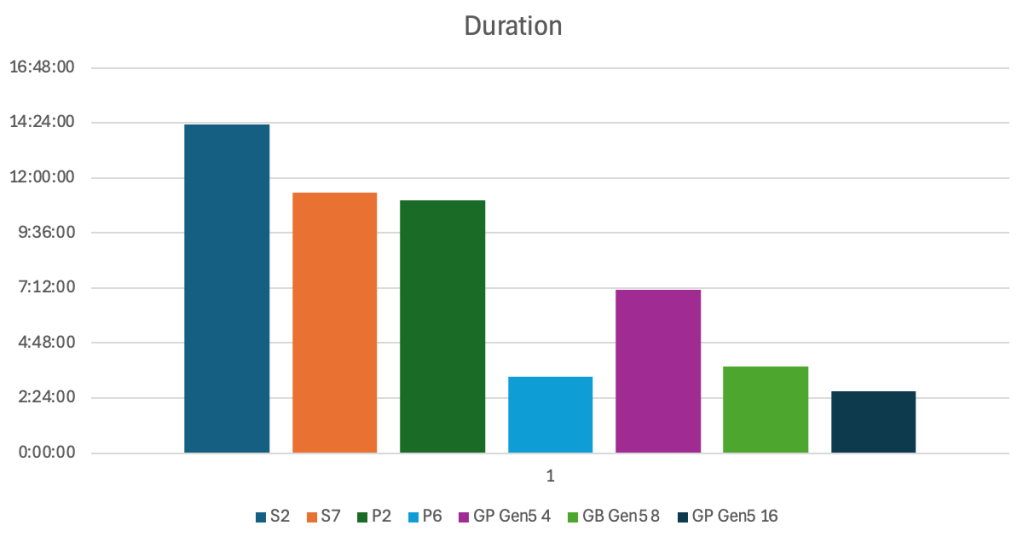
Not much between S7 and P2 in duration, a huge jump when moving to P6 though! Now with General Purpose added in the mix, you can see that 4 cores GP beats Standard and P2. To beat P6, you need to move to GP 16 cores, which is a serious price hike. But let’s look at the MB per second first.
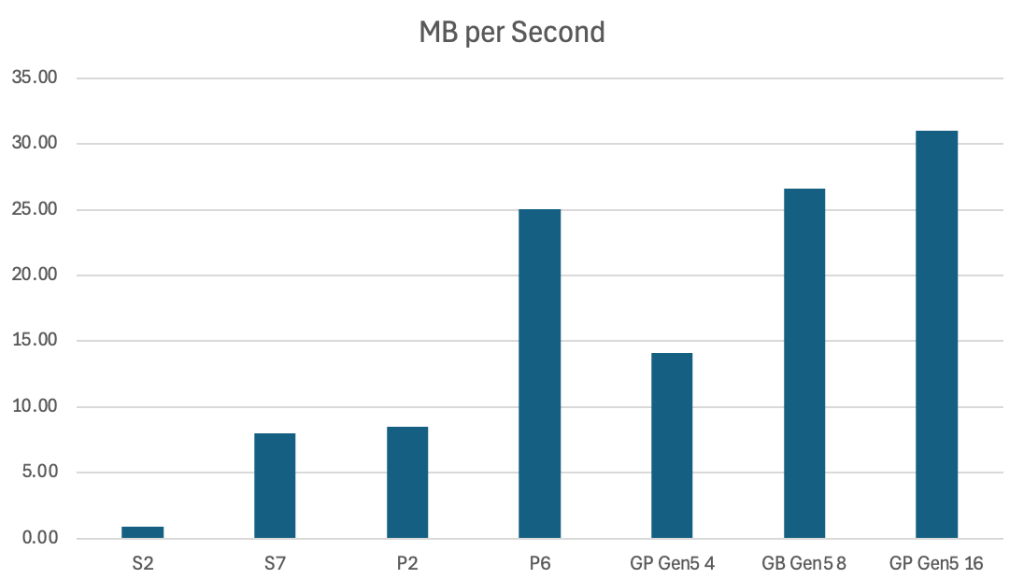
This bar chart shows the difference in average megabytes per second over the three different files. It’s the opposite of duration (which isn’t a surprise), where S7 and P2 are alike, but P6 is racing ahead! To beat the P6, you have to move to 8 or 16 cores General Purpose.
Let’s look at the cost. I’ve included the storage cost, since it’s something to consider as well. I’ve added the database’s monthly cost and the primary storage. With different tiers, you have several extra options to choose from, each adding to your database cost. To keep me sane, I’ve opted not to include those.
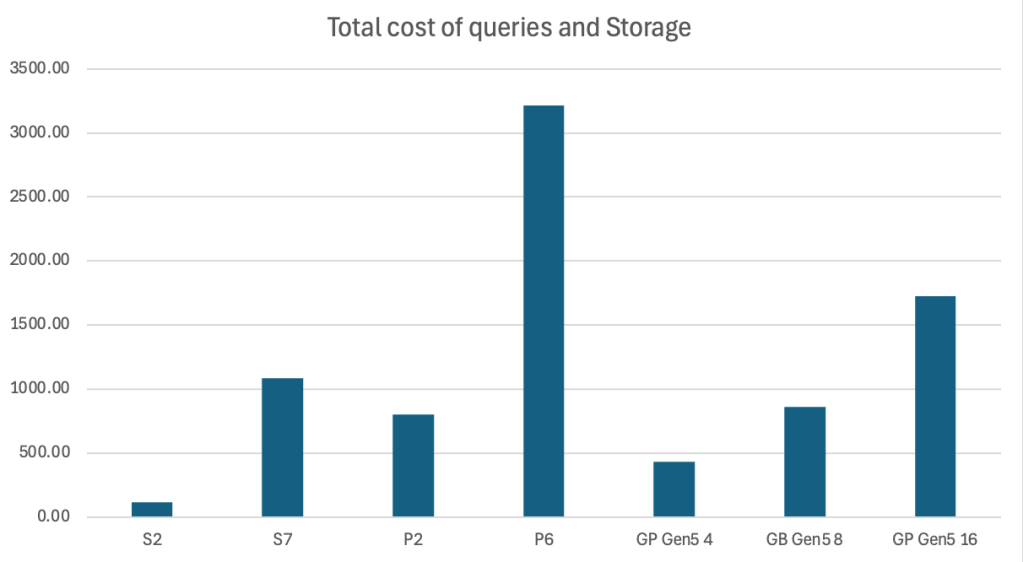
Now, the charts suddenly look very different! P2 is cheaper than S7; P6, with all of its performance, is something you pay for. In all honesty, I was expecting the General Purpose to be win when it comes to being expensive, but you really a premium for performance. But hey, who knows if there will be an even more pricey option.
In the end, it all comes down to how much you’re willing to pay for performance. And you’ll run a lot more queries than I do to test the database.
Next up in this series: the business critical database!

