

I was trying out some things to learn more about RegEx when I ran into something weird. When using REGEX_LIKE in a query, I got an error in both SQL Server and Azure SQL Hyperscale.
Now, I learned what will be shared in this blog from Cláudio Silva, Greg Low, and Erland Sommarskog. They were very kind to share their experiences and knowledge. However, if there are mistakes in this blog, they are mine and mine alone.
The error
So, what’s the error?
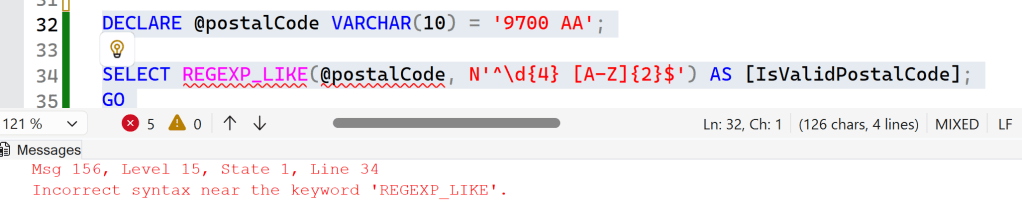
I’ve declared a variable and assigned it a value. Now, I want to check if my variable matches the regular pattern of Dutch postal codes. These codes are four numbers followed by two letters. Using a regular expression helps check validity.
My expectation was that this query would return either 1 or TRUE. In any case, a result telling me that the postal code is valid. Instead, it throws an ‘Incorrect syntax error near the keyword ‘REGEXP_LIKE’.
Analysis
This meant I had to do some digging. First, let’s look at the official documentation. With the benefit of hindsight, that should have been my first clue.
Looking at the docs, the first example shows this:

Another regular expression function shows this:

The difference is that REGEXP_LIKE is in the WHERE clause, and REGEXP_REPLACE is in the SELECT clause.
When you read the rest of the docs, you can see that REGEXP_LIKE doesn’t appear in the SELECT clause at all. But why not?
The benefit of the community
I asked this question to the MVP community. And they did not disappoint!
What happens is the following. REGEXP_LIKE doesn’t return a BIT (1 or 0), but a BOOLEAN (True or False). The thing is, SQL Server doesn’t really know how to handle a true boolean data type. To mitigate this, you need to change the query in a way that SQL Server understands the result and can create an output.
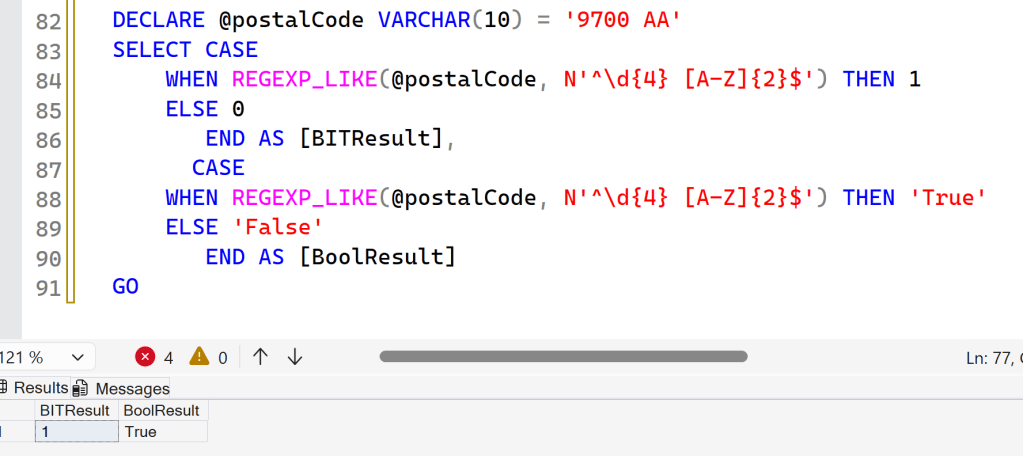
Using a CASE WHEN statement solves this issue, because the internal logic of CASE WHEN (or, for the programmers under us, IF-THEN) can handle a boolean and return a value determined by the writer of the SQL code. In this case, I opted for two outputs. The first one being a numeric result, it either being 1 or 0. The second is a string result with values true or false.
Now, regardless of whatever calls this query, it can handle the output and do whatever is necessary. Cool, issue solved.
Prove it
So, how do we know that there is a boolean at play? Let’s try and find this out. To do this, I changed a few things to actually show the result.
CREATE TABLE dbo.postalcodes (
	id INT IDENTITY(1,1) PRIMARY KEY,
	postal_code VARCHAR(10)
);

Insert into dbo.postalcodes (postal_code) VALUES
('9700 AA')

SELECT *
FROM dbo.postalcodes
WHERE REGEXP_LIKE(postal_code, N'^\d{4} [A-Z]{2}$')
I want to see what happens when using the REGEXP_LIKE function on a table. To see more of what’s happening under the covers, let’s look at the execution plan.
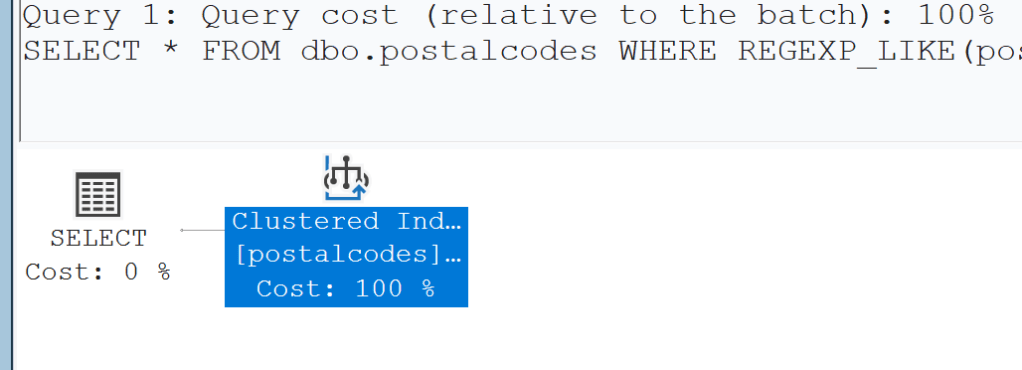
This plan is simple enough, and not really unexpected as the query is very simple too. But, when you hit F4, you can see the details and then more is revealed.
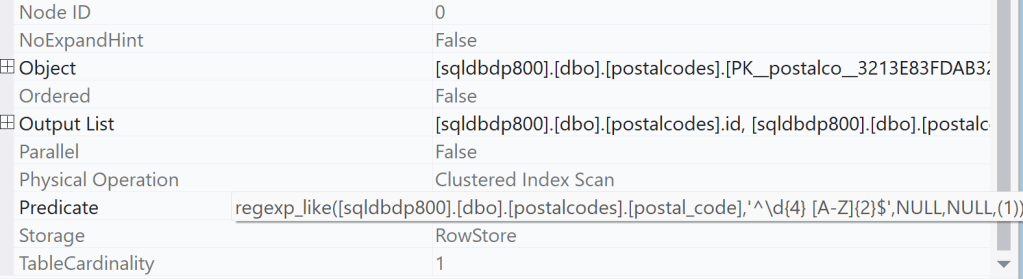
The way my query is written, it should only return values from the table where the result of the REGEXP_LIKE is true. The engine adds some complexity to the function with two NULLS but ends with a (1), the TRUE output or boolean.
Concluding
So, when you work with Regular Expressions, be mindful of where they should land in your query. Read the docs, read them again, and figure out how they can fit in your syntax. As you’ve seen here, it’s not always obvious where functions should go!


There’s a minor flaw in your postal code check, because the first digit can never be a 0, the range is from 1000AA to 9999XX. Unofficial: for an unknown postal code is often 0000XX used.
Fun fact: I stumbled against the same problem.
LikeLike
Correct observation. Although the idea of the demo was to show how it technically works, not to create a fully functional and watertight solution, in that case I should have excluded all the non-existent ones as well. But yeah, don’t use this code in production 🙂
LikeLike