

That’s a lot of D’s. It’s also my rating; people like Kevin Chant rate at least an A.
Anyway, Kevin has written a lot about working with CI/CD; I’m here to clarify what I ran into while building a solution to deploy Fabric code from the Dev environment (a set of workspaces) to production. This is also where Kevin put me back on the rails after I veered off.
What’s the use case?
Let me generalise first: you can essentially choose two options to promote your hand-crafted and superior code compared to anyone else from development to production. The first way is to use the Fabric deployment pipelines. These are essentially copy actions that move the development state to production. Option two is to use either GitHub Actions or Azure DevOps pipelines.
The main issue I’ve seen with the Fabric deployment pipelines is that the deployed code still references the development environment. This results in your notebook running in production and happily writing the results in the development lakehouse. To mitigate this, you can add actions to the Fabric pipeline, check out the newly announced Fabric deployment plans, or remember to update all references.
Why DevOps pipelines?
Well, it’s a more mature CI/CD way of working. It not only enforces a more controlled way of working and deployment, but also helps track what went live and when. Everything is logged.
You can also add gates to your deployment, giving you an extra moment to reflect on whether the deployment is the best option or to review all the changes before they go live.
What are the prerequisites?
In my setup, I’ve found a few.
- You need an Azure Key Vault
- You need an App Registration (also known as an Enterprise App, SPN) with a secret
- You need to create a Service Connection from DevOps to the Azure Key Vault
- The App Registration needs a lot of permissions in your Fabric tenant, including permissions on the connection(s)
- You need to create a Variable Group (which is hidden in the aptly named folder Library under the pipelines
- You need to make sure the App Registration is allowed to use the Fabric API’s (setting in Fabric)
I’m listing these because, in some environments, you might be the person who can fix all of this. In other companies, you might have to talk to other departments, teams, or people to get this fixed. And, depending on the type of company, this may take time. And effort. And coffee-machine moments. Even the odd cookie or chocolate snack.
How does it work?
Let me draw a very simplified picture.
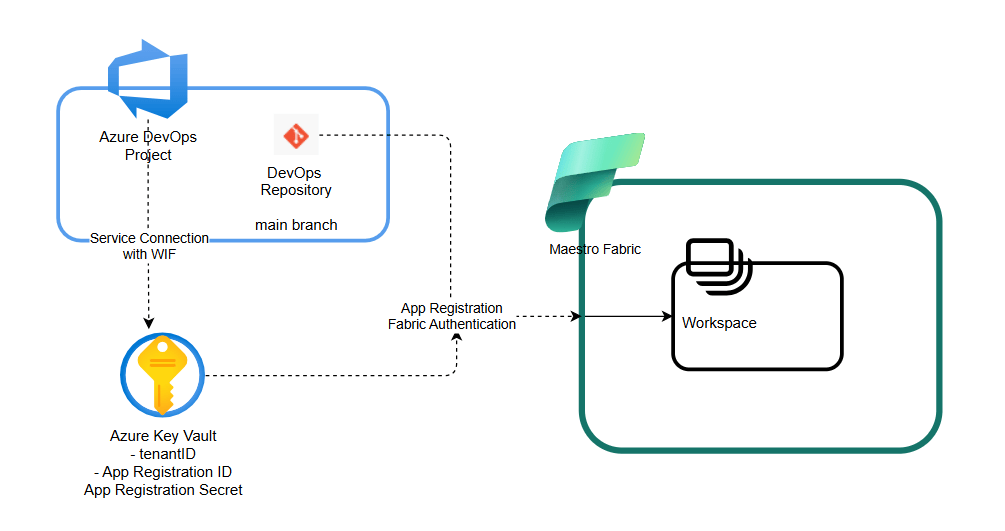
You have your Azure DevOps project with a repository and a main branch that you want to publish. When you run the deployment pipeline, it uses the WIF connection to retrieve the App Registration details. The pipeline can then authenticate to Fabric, tell it what it wants to do, and, if the account settings in Fabric are set correctly, deploy to the workspace.
What’s a WIF??
Very good question, and this is exactly where my thinking broke. My initial thought was that I could leverage the App Registration to connect to Azure Key Vault, retrieve the values from the different secrets, and then move on. But I found that using an App Registration didn’t work at all, even when it had the correct access to the Key Vault.
You can find this when you create a Service Connection to Azure ARM:
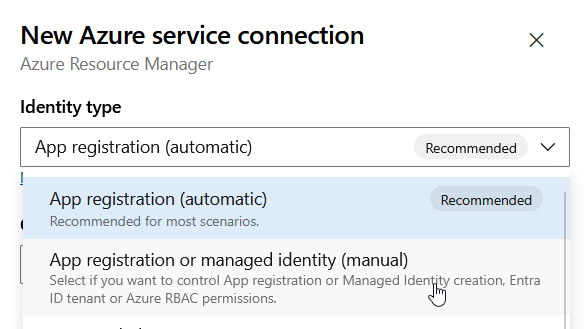
When you create the automatic one, it will create a new app registration for you. You can also use an existing App registration that already has the correct settings in the Key Vault and inside Fabric.
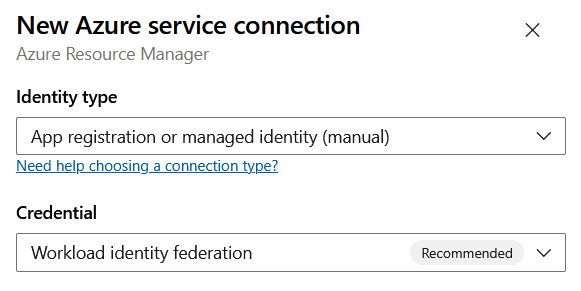
You need to fill a few text boxes with the correct ID’s. You will also get something in return to add to your app registration:
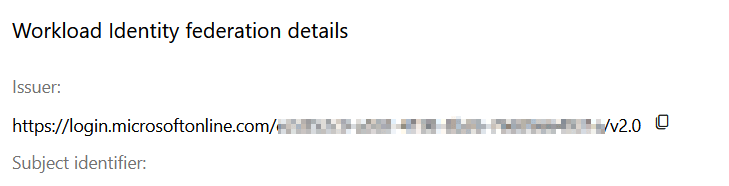
Add these values to the app registration.
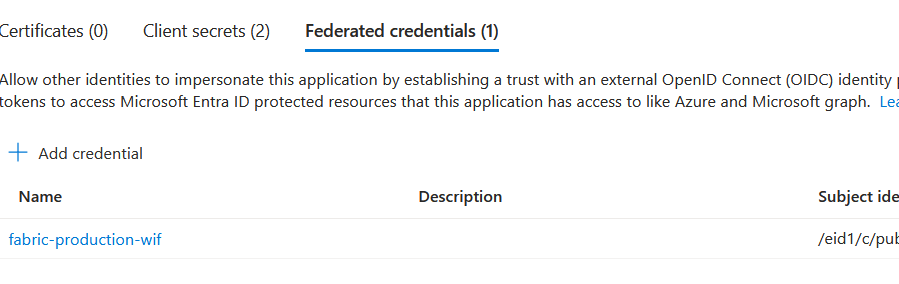
This lets Azure DevOps use the App Registration to connect to your Key Vault and retrieve secrets.
Using the secrets
When you create a Key Vault, it’s for a reason. You want to store your secrets in a secure, trusted resource. Azure Key Vaults have been around for ages (well, judging from an Azure perspective); everyone knows them, has built policies around them, and accepts them as the default for storing secrets, keys, and certificates. Whenever we discuss how to store secrets with a client, Azure Key Vault immediately ticks boxes, and we can move on.
As the simple diagram above shows, the deployment pipeline needs to authenticate to Fabric using the App Registration. The data lives in Key Vault, and we need to bind it to the pipeline. This can be done using Variable Groups. These come in two flavours: secret and non-secret.
The secret one is the one you’re looking for. To find the Variable Group, look under Library in the Pipelines folder in DevOps. It’s a little hidden, but you’ll get there.
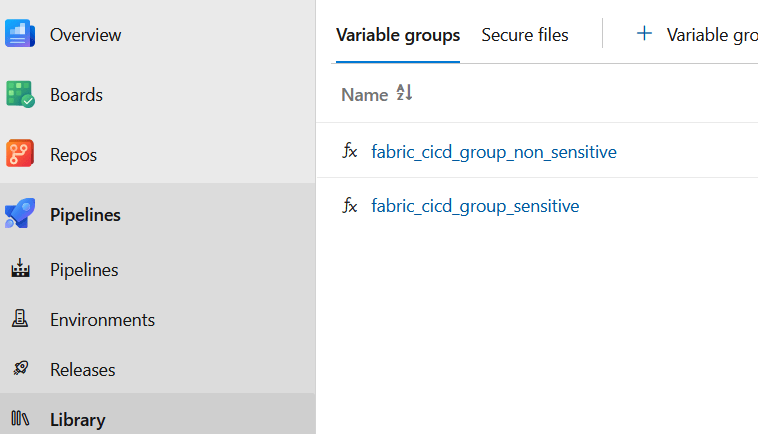
When you create the secure one, use the Service Connection you created earlier. This will lead you to the correct subscription and Key Vault. When authentication works, you can select the secrets you need.
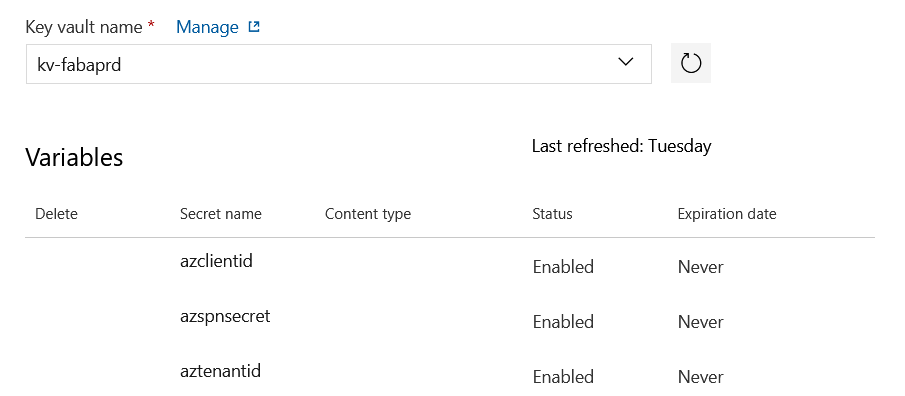
Now, when the pipeline runs, it can use the credentials to do its business inside of Fabric, deploy and move on.
Deployment itself?
For this, you need to write YAML code. There’s no way around it; I really dislike the language. It’s the same with every programming language that enforces spaces because they have meaning. That’s why I dislike Java-based code, and I even run into many errors when trying to write PySpark. One missing space can have a huge impact. I don’t understand why the creators never thought to use curly, square, or round brackets to work around this; other programming languages do.
In any case, you can build your pipeline however you like. Just remember one thing:
If your solution can’t be rebuilt from source control, you don’t have DevOps. You have hope.
Sander Stad shared this quote at Data Saturday Holland last week, and it is also a huge reason to use DevOps: when stuff breaks, make sure you can roll back.
What about GitHub Actions?
Excellent question. Right now, the customers we help all use Azure DevOps; that’s why I went down this route. I’ve tried GitHub Actions before, and they seem to work just as well. There are differences, but the end result is largely the same; changes get deployed.
Anything to be aware of?
Yes! When you use this route, the App Registration owns every item in Fabric. That sounds excellent, since it removes the need for humans to log in every 60 days to refresh their token. The thing is, even though items can be owned by an App Registration, some items still require the App Registration to log in and refresh the token. The Lakehouse, for instance. You could qualify that as an important item in Fabric. When you release regularly, there shouldn’t be a problem. When the cadence slows down, however… Be aware of this; I really hope Microsoft fixes the entire ownership struggle fast.

